Cisco has updated their UCS management pack to add some additional support v4.1.3.0 is available from Cisco directly click here (requires cisco.com login)
Now includes support for SCOM current branch up to 1807 as well as the following versions of Cisco IMC:
Supported Cisco UCS Manager Releases
Cisco UCS Management Pack Suite for Microsoft System Center Operations Manager is compatible with the following Cisco UCS Manager releases:
Release 3.2
Release 3.1
Release 3.0
Release 2.5
Release 2.2
Release 2.1
Supported Cisco IMC Release
Cisco UCS Management Pack Suite for Microsoft System Center Operations Manager is compatible with the following Cisco IMC releases:
Release 3.1
Release 3.0
Release 2.0(3) or higher
Supported Cisco UCS Central Releases
Cisco UCS Management Pack Suite for Microsoft System Center Operations Manager is compatible with the following Cisco UCS Central releases:
The first update for System Center Operations Manager has just been released, what do you need to know about SCOM 1807?
Updates work the same way as the Update Rollups you are used to you can use windows update or get the packages manually here
First what’s fixed?
Issues that are fixed and improvements that are included
Fixes an issue that sometimes cause the Performance widget in the web console to throw an ArgumentExceptionmessage.
Fixes an issue that prevented the Alert view URL in the notification channel from to pointing to the new drill-down Alert page.
Fixes an issue that causes the web console to throw an ArgumentException message when the state widget is added to a dashboard or scoped to a specific group.
Improvement to the web console so that is now supports nondefault ports.
Fixes an issue that causes the pseudo file system to be enumerated.
Fixes an issue that caused the DNS 2016 Management Pack to throw false alerts for “DNS unused Zone Detected.”
Fixes an issue that caused the MySQL version to be listed as “for,” “on,” or NULL in Detail view for some platforms.
Improvement that enables Monitoring Solaris 10 Agents (x86) to provide heartbeat alerts and configuration errors about the SSL certificate.
Fixes an issue that prevented the Operations Manager console, the Service Manager console and PowerShell modules to coexist on the same server.Note Both Operations Manager and Service Manager must be upgraded to version 1807 to resolve this issue.
Fixes an issue in which Active Directory Integration rules were not visible or editable in an upgraded 2016 Management Group. This issue prevented the ongoing management of Active Directory integration assignment in the upgraded Management Group.
Fixes an issue that caused the system and MonitoredBy information to be displayed incorrectly in the Unix/Linux Computers view when the UNIX host name on the server is lowercase.
Fixes an issue that caused Active Directory integrated agents not to display correct failover server information.
Fixes an issue in Performance views in the web console that caused the selection of counters not to persist after a web console restart or refresh.
Fixes an issue in which the PowerShell cmdlet Get-SCXAgent fails and returns a “This cmdlet requires PowerShell version 3.0 or greater” error.
Fixes an issue in which a group name is changed through the operations console, the Get-SCOMGroup cmdlet does not retrieve the group data that includes the changed group name.
Fixes an issue that causes error HTTP 500 to occur when you access Diagram view through the web console.
Improvement in which the SQLCommand Timeout property is exposed so that it can be dynamically adjusted by users to manage random and expected influx of data scenarios.
Fixes an issue that caused the MonitoringHost process to crash and throw the exception “System.OverflowException: Value was either too large or too small for an Int32.”
Fixes an issue when company knowledge is edited by using the Japanese version of Microsoft Office through the Operations Manager console, you receive the following error (translated into English): “Failed to launch Microsoft Word. Please make sure Microsoft Word is installed. Here is the error message: Item with specified name does not exist.”
Fixes an issue that causes Microsoft.SystemCenter.ManagementPack.Recommendations to log errors on instances of Microsoft SQL Server that have case-sensitive collations.
And then what’s new?
Improvements to the HTML5 webconeole experience including:
Addition of a Powershell widget
Create HTML5 dashboards in MyWorkspace.
View HTML5 Network Node and Network Interface dashboards.
Create maintenance schedules from the HTML5 web console.
You can now enable or disable APM when pushing the agent from the console.
The Linux agent now supports Log rotation monitoring
Support for SQL 2017, there is a catch however you will need to update your existing SCOM to 1807 before you can upgrade your SQL to 2017
The updated Management packs for OSS MySQL and Apache can be found here.
The Management Packs for Open Source Software enable discovering, monitoring, and managing MySQL Server and Apache HTTP Server. They provide reactive and proactive monitoring of MySQL Server and Apache HTTP Server running on Linux operating systems. The monitoring provided by the Open Source Software management packs includes availability and configuration monitoring, performance data collection, and default thresholds. In addition to health monitoring capabilities, the Open Source Software management packs include reports, diagnostics, tasks, and views that enable near real-time diagnosis and resolution of detected issues.
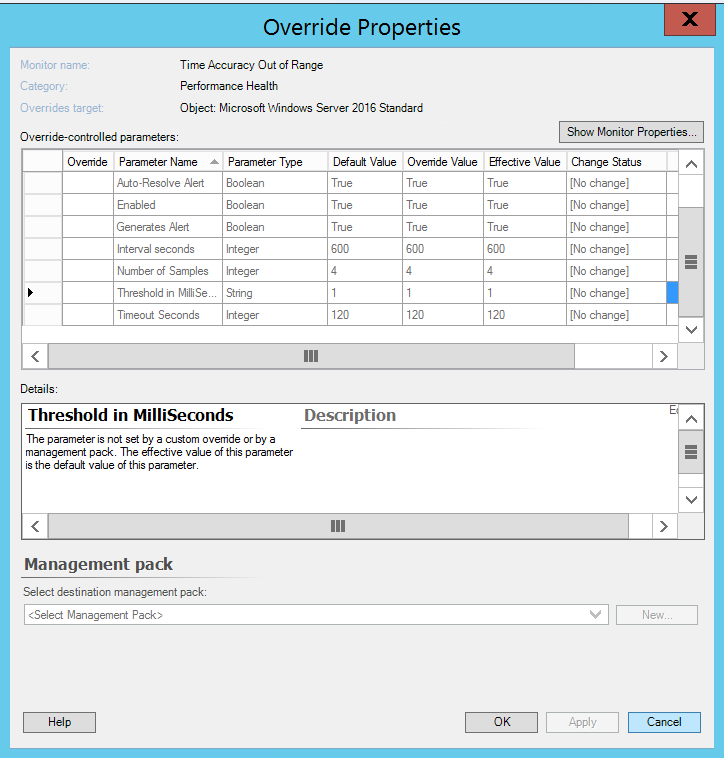
One of my customers contacted me regarding a rather strange situation, whenever they try to apply an override they are unable to because the checkbox is missing.
As it turns out this the solution while unusual is quite simple, the screen resolution on their server is too high. In this case, for this particular version of Operations Manager the resolution was higher than 1600×900.
Once we dropped the resolution to 1600×900 the check boxes reappeared.
New versions of the SQL MPs have been released you can get them using the links below:
SQL Server
SQL Server 2017+ – here SQL Server 2016 – here SQL Server 2014 – here SQL Server 2008-2012 – here
SSAS
SSAS 2016 – here SSAS 2014 – here SSAS 2012 – here SSAS 2008 – here
SSRS (Native Mode)
SSRS 2016 – here SSRS 2014 – here SSRS 2012 – here SSRS 2008 – here
SQL Server 2017+ MP New Features and Fixes
Implemented an ability to monitor SQL Server Cluster instances locally; formerly, it was possible only in Agentless and Mixed modes
Added the SSIS monitoring
Added the “Exclude List” property in DB Engine Discovery in order to filter instances, which are not subject to monitoring
Added the “Exclude List” property in DB Discovery in order to filter databases, which are not subject to monitoring
Implemented a feature: both “Exclude List” properties support usage of the asterisk character to make the filter more flexible; e.g. “*temp” is used to exclude instances/databases ending with “temp” and having anything in the beginning
Added the “Computers” view
Added the “ClusterName” property to the AG class and updated AG alerts in order to display the property within
Updated the “SP Compliance” monitor in order to support the Modern Servicing Model for SQL Server: the monitor will check build number instead of Service Pack number
Updated the “SPN Status” monitor so that it requires only a single SPN record when only TCP/IP is enabled and the instance is the default one
Updated the “Database Backup Status” monitor: it is disabled by default now
Updated the DB Space monitors so that their alert descriptions include the actual value of space available
Updated the “Configuration Security” section in the guide
Fixed issue: The “Database Health Policy” monitor ignores the “Critical” state (on Windows only)
Fixed issue: The “Alert severity” property of the “DB File Free Space Left” monitor has incorrect Default Value
Fixed issue: The “DB Filegroup Fx Container” rollup monitor has an alert parameter with a wrong value within
Fixed issue: “Resource Pool Memory consumption” monitor may not change its state to “Critical” for the “default” resource pool
Fixed issue: “Number of Samples” parameter of “Resource Pool Memory consumption” alert displays incorrect data
Fixed issue: Missed image resources in the SQL Server 2017+ Core Library
Fixed issue: “The agent is suspect. No response within last minutes” alerting rule does not catch appropriate events due to the wrong source
SQL Server 2014-2016 MP New Features and Fixes
Updated alert severity in some monitors
Updated the display strings
Updated the “Max worker thread count” data source of the corresponding monitor and performance rule
Fixed issue: In some environments, DB Space workflows fail when a secondary database is non-readable
Fixed issue: The “Transaction Log Free Space (%)” monitor does not work
Fixed issue: The “The agent is suspect. No response within last minutes” alerting rule does not catch appropriate events due to a wrong source
SQL Server 2008-2012 MP New Features and Fixes
Fixed issue: In some environments, DB Space workflows fail when a secondary database is non-readable
Fixed issue: The “The agent is suspect. No response within last minutes” alerting rule does not catch appropriate events due to a wrong source
Fixed issue: The “DB File Space” monitor in the SQL 2008 management pack throws error events due to the unnecessary $ character in its alert configuration
Updated the “Max worker thread count” data source of the corresponding monitor and performance rule
Fixed issue: The “Transaction Log Free Space (%)” monitor does not work
SSAS 2008-2016 MP New Features and Fixes
Updated the Visualization Library
SSRS 2008-2016 MP New Features and Fixes
Added support for cases when a connection string of the SSRS instance to the SSRS Database is not in the “MachineName\InstanceName” format; e.g., “<IP Address>, <Port Number>” or “(local)”, etc. Such connection strings are fully supported for default SQL Server instances hosting the SSRS Database. If the instance is named, workflows targeted at the SSRS Instance object work properly, but those targeted at the Deployment object cannot work, as there is no possibility to learn the FQDN of the server.
Updated the Deployment Seed discovery so that it does not check if the SQL Server instance hosting the SSRS Database is running
An updated management pack has been released for Windows Server 2016 and 1709 Plus get it here
My colleague Kevin Holman has written a fantastic article on the new features in this management pack available here.
The article includes a word of caution regarding the new Port and Process monitoring MP as it can overwhelm your Data Warehouse if you turn this on indiscriminately.