The ATA management pack has been updated to include support for ATA 1.9 get it here
What is Advanced Threat Analytics?
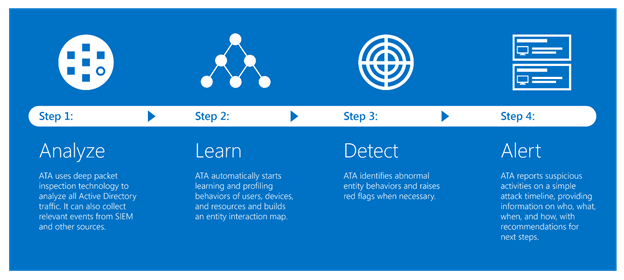
Advanced Threat Analytics (ATA) is an on-premises platform that helps protect your enterprise from multiple types of advanced targeted cyber attacks and insider threats.
As usual you can get it from the catalog hereor through windows update.
all in all this looks like a good update and solves a few persistent issues form previous versions.
Updates and Fixes
SCOM console and Service Manager console for PowerShell modules can now coexist on the same server.Note Both SCOM Update Rollup 5 (this update) and Service Manager Update Rollup 5 (update KB 4093685) must be installed to resolve this issue.
Active Directory Integration rules are not visible or editable in an upgraded 2016 Management Group. This prevents the ongoing management of Active Directory integration assignment in the upgraded Management Group.
When the UNIX host name on the server is in lowercase, the OS and MonitoredBy information is displayed incorrectly in the Unix/Linux Computers view.
Active Directory integrated agents do not display correct failover server information.
Performance views in the web console do not persist the selection of counters after web console restart or refresh.
The PowerShell cmdlet Get-SCXAgent fails with error “This cmdlet requires PowerShell version 3.0 or greater.”
During the upgrade from SCOM 2016 to SCOM 1801, if the reporting server is installed on a server other than the management server, the upgrade fails. Additionally, you receive the error message, “The management server to which this component reports has not been upgraded.”
If a group name has been changed through the operations console, the Get-SCOMGroup cmdlet does not retrieve the group data that includes the changed group name.
Error HTTP 500 occurs when you access Diagram view through the web console.
When you download a Linux management pack after you upgrade to SCOM 2016, the error “OpsMgr Management Configuration Service failed to process configuration request (Xml configuration file or management pack request)” occurs.
The SQLCommand Timeout property is exposed so that it can be dynamically adjusted by users to manage random and expected influx of data scenarios.
The MonitoringHost process crashes and returns the exception “System.OverflowException: Value was either too large or too small for an Int32.”
When company knowledge is edited by using the Japanese version of Microsoft Office through the SCOM console, the error (translated in English) “Failed to launch Microsoft Word. Please make sure Microsoft Word is installed. Here is the error message: Item with specified name does not exist” occurs.
Accessing Silverlight dashboards displays the “Web Console Configuration Required” message because of a certificate issue.
Microsoft.SystemCenter.ManagementPack.Recommendations causes errors to be logged on instances of Microsoft SQL Server that have case-sensitive collations.
Deep monitoring displays error “Discovery_Not_Found” if the installation of JBoss application server is customized.
Adds support for the Lancer driver on IBM Power 8 Servers that use AIX.
The ComputerOptInCompatibleMonitor monitor is disabled in the Microsoft.SystemCenter.Advisor.Internalmanagement pack. This monitor is no longer valid.
Just a quick cross post from my college Robert Bird original posting here.
Be aware that when upgrading to SCOM 1801 in order to upgrade reporting successfully you need to install the SCOM console onto the SSRS instance first otherwise the upgrade will fail.
Just announced here the new System Center Semi-Annual Channel release now available!
Xpost of new features below:
What’s in System Center, version 1801?
System Center, version 1801 focuses on enhancements and features for System Center Operations Manager, Virtual Machine Manager, and Data Protection Manager. Additionally, security and bug fixes, as well as support for TLS 1.2, are available for all System Center components including Orchestrator, Service Management Automation, and Service Manager.
I am pleased to share the capabilities included in this release:
Linux monitoring in Operations Manager:Linux monitoring has been significantly improved with the addition of a customizable FluentD-based Linux agent. Linux log file monitoring is now on par with that of Windows Server (Yes, we heard you! Kick the tires, it really works).
Improved web console experience in Operations Manager: The System Center Operations Manager web console is now built on HTML5 for a better experience and support across browsers.
Faster, cost-effective VMware backup: Using our Modern Backup Storage technology in Data Protection Manager, customers can backup VMware VMs faster and cut storage costs by up to 50%.
And much more including Linux Kerberos support and improved UI responsiveness when dealing with many management packs in Operations Manager. In Virtual Machine Manager, we have enabled SLB guest cluster floating IP support, added Storage QoS at VMM cloud, added Storage QoS extended to SAN storage, enabled Remote to VMs in Enhanced Session mode, added seamless update of non-domain host agent, and made host Refresher up to 10X faster.
As well as consistent evaluation and license experiences across components.
Customers should consider supplementing System Center with Azure security & management capabilities for enhanced on-premises management and for the management of Azure resources. We have included the following updates in System Center, version 1801:
Service Map integration with Operations Manager: Using the Distributed Application Diagram function in SCOM, you can automatically see application, server, and network dependencies deduced from Service Map. This deeper endpoint monitoring from SCOM is surfaced in the diagram view for better diagnostics workflows.
Manage Azure ARM VMs and special regions: Using a Virtual Machine Manager add-in, you can now manage Azure ARM VMs, Azure Active Directory, and more regions (China, US Government, and Germany).
Service Manager integration with Azure: Using the Azure ITSM integration with Azure Action Groups you can set up rules to create incidents automatically in System Center Service Manager for alerts fired on Azure and non-Azure resources.
An updated management pack has been released for AudioCodes™ get it here.
The following AudioCodes gateways are currently supported:
Mediant 4000 E-SBC
Mediant 3000 Gateway and E-SBC
Mediant 2600 E-SBC
Mediant 2000 Media Gateway
Mediant 1000 Media Gateway
Mediant 1000B Gateway and E-SBC
Mediant 1000B MSBR
Mediant 800 MSBR
Mediant 800B Gateway and E-SBC
MediaPack Media Gateways MP-124 (FXS)
MediaPack Media Gateways MP-118 (FXS and FXO)
MediaPack Media Gateways MP-114 (FXS and FXO)
MediaPack Media Gateways MP-112 (FXS)
MediaPack 1288