Microsoft has released a new wave of Management Packs this month primarily around MSMQ (Microsoft Message Queuing) and Client Operating Systems also an update for the Azure MP.
Changes, download links and config guides can be found by following each link.
Microsoft recently released updates to several management packs, including the following:
Windows Base OS MP – updated to version 6.0.7230.0 and is available for download here.
Fixed issues:
Bug fixed: Microsoft.Windows.Server.LogicalDiskDiscovery.Module.Type.vbs script does not discover logical disks with large disk size
Update to support two configurable threshold values (waiters and timeouts) for triggering alert ‘MAX concurrent API Reached’
Jimmy Harper has also written a nice summary of the “Max Concurrent API Monitor” fix included in the new version of the Windows Server Operating System Management Pack
One change that may require some attention is the update to the “Max Concurrent API Monitor”.
In the previous version of the MP (6.0.7061.0), the Max Concurrent API monitor would run a script that looks at three Netlogon semaphore counters (Waiters, Holders, and Timeouts). If any of them are greater than 0 and less than 4gb, then we generate an alert. Some customers were seeing false alerts from the Monitor due to some of the counters (especially Semaphore Holders) being greater than zero during non-problematic conditions.
In the new version of the Management Pack, the Max Concurrent API Monitor has the following changes:
The Semaphore Holders counter has been removed from the criteria that generates the alert
The Alert will only be generated if Semaphore Waiters or Timeouts exceed a defined threshold (instead of 0). These thresholds can be configured as needed via Overrides. The default thresholds are:
Semaphore Waiters = 50
Semaphore Timeouts = 2000
More information on the MaxConcurrentAPI setting can be found here.
Active Directory – updated to version 6.0.8293.0 and is available for download here.
Fixed issues:
Issue fixed: AD-Trust Monitor does not come back to healthy state
Issue fixed: AD_Database_and_Log.vbs does not support using ‘.’ as decimal sign for non-English account.
Cluster – updated to version 6.0.7230.0 and is available for download here.
Fixed issues:
Cluster 2008 MP does not collect certain performance metrics.
DNS – updated to version 7.1.10259.0 and is available for download here.
Fixed issues:
DNSMetrics2012R2Probe script can cause high CPU in MonitoringHost.exe
DHCP – updated to version 6.0.7230.0 and is available for download here.
Yesterday a new version of the PKI Certificate Verification management pack was released by Raphael Burri, version 1.2.1.3 contains the following changes:
This update is mostly about more powerful filtering options for the certificate discoveries
It is now possible to use regular expressions to:
Include / Exclude based on “Subject”
Include / Exclude based on “Issuer”
Exclude based on “Enhanced Key Usage” OIDs
Note that the filters will have to be based on the exact string output of the certificate objects as presented in PowerShell. Hence check those before attempting to write RegEx filters using:
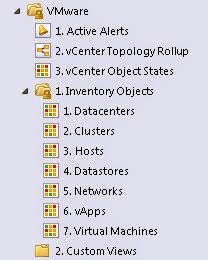
This management pack was brought to my attention by Mitch Luedy in response to a question I posed about VMware monitoring solutions for SCOM that specifically showed Datastore information. It’s is always great to see the monitoring community coming together to enhance the solution as a whole.
The MP is available as a free download from here and offers Availability and Performance Monitoring of VMware vCenter Inventory Objects as well as state relationships between various VMware objects.
The management pack uses VMware PowerCLI and PowerShell to gather vCenter objects and come with pre-created views such as below:
Screenshots courtesy of http://madscomer.blogspot.com/
A name that that synonymous with monitoring VMware in the System Center Space, Veeam has now expanded their capabilities to give us the same depth and richness of features when monitoring Hyper-V.
Previously I wrote about the beta for the new Veeam Management Pack™ v7 adds support for Hyper-V. Well it has now been released and Veeam even has a special offer, you can get it for free!
“Limited Time Offer! Register today and get up to 100 sockets of Veeam Management Pack v7 Enterprise edition to manage your Hyper-V environment at no cost! Offer ends December 31, 2014.”
Here is a quick recap of the new features in v7:
Support for Hyper-V
Unique dashboards with customizable Veeam widgets
Veeam task manager for Hyper-V
Capacity planning for Hybrid Cloud
Monitoring and reporting for Veeam Backup & Replication Hyper-V environments
Microsoft has recently release updated management packs for SQL, the new version is 6.5.1.0. The new features and fixes list is available at each of the download links.
These have been updated:
System Center Management Pack for SQL Server 2014: Download here
System Center Management Pack for SQL Server (2005/2008/2102): Download here
These are new:
System Center Management Pack for SQL Server 2014 Reporting Services (Native Mode): Download here System Center Management Pack for SQL Server 2012 Reporting Services (Native Mode): Download here
System Center Management Pack for SQL Server 2008 Reporting Services (Native Mode): Download here
As always thoroughly test before deploying into your production environments.
Kevin Holman recently published a great article about the inherent pitfalls of importing a management pack into an environment without understanding the intended scope, scalability, and any known/common issues.
Specifically he discusses the Dell Hardware Management Pack (Detailed Edition) which has a small scalability limitation of 300 agents.
The lesson to learn here is – be careful when importing MP’s. A badly written MP, or an MP designed for small environments, might wreak havoc in larger ones. Sometimes the recovery from this can be long and quite painful. An MP that tests out fine in your Dev SCOM environment might have issues that wont be seen until it moves into production. You should always monitor for changes to a production SCOM deployment after a new MP is brought in, to ensure that you don’t see a negative impact. Check the management server event logs, MS CPU performance, database size, and disk/CPU performance to see if there is a big change from your established baselines.
Go here for the full article, definitely worth the read.
It is always great when the capabilities of Operation Manager are extended to monitor new areas that were previously outside of the general WinTel scope. The latest addition from NiCE is a zLinux management pack.
The NiCE zLinux MP is the first product of its class that provides monitoring of Linux server distributions on the IBM system z platform using Microsoft System Center. IBM System z is a universal name used by IBM for all its mainframe computers. These mainframe computers have gone through a number of name changes and are also known as System/390 or zSeries.
This management pack allows for inclusion of your zLinux components into your SCOM system which enables you to get a complete picture of the systems that are dependent on zLinux in a single end-to-end view.
Features • Perform ‘Logical Disk Health checks’i.e. easily ascertain the availabilityand performance of your LogicalDisk (File System) instances • Carry out ‘Network AdapterHealth checks’ i.e. determine theavailability and performance ofyour Network Adapter instances • Execute ‘Operating System Healthassessments’ i.e. effortlesslydiscover the availability andperformance for Red Hat Enterprise Linux Server Operating Systeminstances • Determine the health of yourprocessor by effectively monitoringyour processor instances
Veeam has recently announced version 7 of their Veeam Management Pack for System Center. The most exciting new feature is the inclusion of support for Microsoft Hyper-V which has been a long awaited addition.
It is currently in public beta which does not include the support for VMware and requires Microsoft System Center 2012 and later and Microsoft Hyper-V 2012 and later.
Click here for more information and to sign up for the beta.
Press release available here.
“New in version 7:
Support for Microsoft Hyper-V — now you get the same deep visibility with monitoring, reporting and capacity planning that you’d expect from Veeam for both Hyper-V and vSphere infrastructures.
Unique dashboards for vSphere and Hyper-V — see what’s happening in your environment in real time. Get in-context views with heatmaps for visualizing multiple metrics.
Visibility of Hyper-V backups in System Center — monitoring, reporting and capacity planning for Veeam Backup & Replication for Hyper-V.”
Microsoft has released version 6.5.0.0 of the SQL MP which enables the discovery and monitoring of SQL Server 2014 Database Engines, Databases, SQL Server Agents and other related components. This Management Pack is designed to run by Operations Manager 2007 R2 (except dashboards), Operations Manager 2012 or Operations Manager 2012 R2.
For more information, including a list of new features and improvements go here.