A new version of the PKI Certificate Verification management pack has been released by Raphael Burri, version 1.2.0.210 is exclusively for SCOM 2012 and contains the following changes:
SCOM 2012 / 2012 R2 support only (the legacy MP 1.0.1.20 is still available for use on SCOM 2007).
main monitoring script now uses PowerShell instead of VB Script, making it compatible with any system locale and easier to maintain.
new, advanced certificate verification flag overrides
Silect has released the SP1 version of their MP Author tool.
It is a free product which enables wizard driven management pack authoring which means you no longer have to be a developer to create a Management Pack.
“Complex. Multi-layered. Too many unnecessary rules and monitors. Applications without management packs. We get it. But you don’t have to be a developer anymore to build your own System Center Operations Manager management packs (MPs). With MP Author you get to be the author, designer and the developer. Our intuitive and intelligent wizard-driven designer lets you build completely new MPs or even customize existing MPs for single or distributed applications—without needing XML skills. And best of all, it’s FREE.” – Silect
With the 6.4.1.0 version of the SQL management pack the SQL 2012 DB Engine group does not contain all SQL 2012 servers. This is due to the group being populated based on a SQL registry key which is looking for a version value of 11.0.xxxx.x, however when updating SQL 2012 to SP1 the version changes to 11.1.xxx.x
Kevin Holman has written a nice blog entry about this particular issue: here. As well as an addendum management pack that contains a new group population discovery set to “11.*” along with an override to disable the built in group, which is available for download at the bottom of his article.
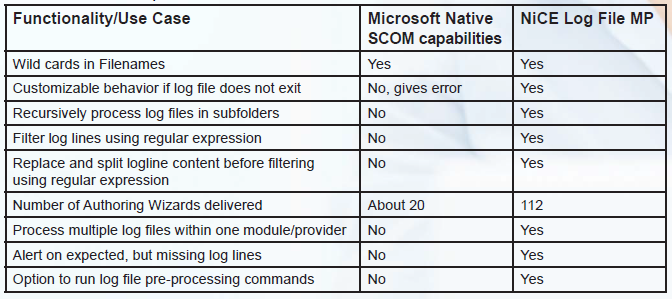
Now as some of you may know out of the box SCOM capabilities to monitor log files can fall a bit short under certain circumstances. Luckily a company called NiCE, which has also developed management pack solutions for applications such as Oracle, SAP, DB2 and others, is releasing a full featured Log File MP to the community and best of all it’s FREE.
Here is a comparison between the Native SCOM capabilities and the enhancements offered by the NiCE Log File MP.
This is a feature rich management pack offering a range of custom rules and monitors which also cater for log line correlation and preprocessing scenarios as well as customizable alerting and behavior for when a log file is missing or does not exist.
Stefan Roth has already written a nice review of some of the management pack capabilities: here using a custom monitor with a robocopy log file to determine when copies have failed.
The free Log File management pack is available for download from http://www.nice.de
When updating the IBM Storage Management Pack to 2.1.0 there are a few things to be aware of, most of which is included in the documentation.
After completing the installation, running the upgrade configuration and removing the old management packs and importing the new ones we still weren’t able to re-discover the IBM SAN.
The documentation recommends, in the configuration section that, “The IBM storage configuration must be synchronized with Management Server manually if there is storage configuration left after upgrading from previous version to version 2.1.0. The IBM storage configuration also should be synchronized with the Management Server manually after the management pack is deleted and re-imported.”
Except that the command skipped all of our SANs.
Checking the SCOM configuration revealed that something which shouldn’t have happened, had happened. The SCOM configuration had been lost during the upgrade
Using the –sc-set command to re-do the configration was successful, which allowed the migration to complete and in short order the SANs were discovered and monitoring.
Something I’ve noticed, being exposed to a variety of SCOM deployments, is that in quite a few cases Management Packs are installed and never looked at again. Generally this seems to stem from either the engineer looking after the environment doesn’t know any better or is perhaps too cautious to perform an update but there may be other specific reasons such as client restrictions.
Never the less it is good practice to check all of your management packs regularly, I’d say at least once a month, to see if any updated versions are available.
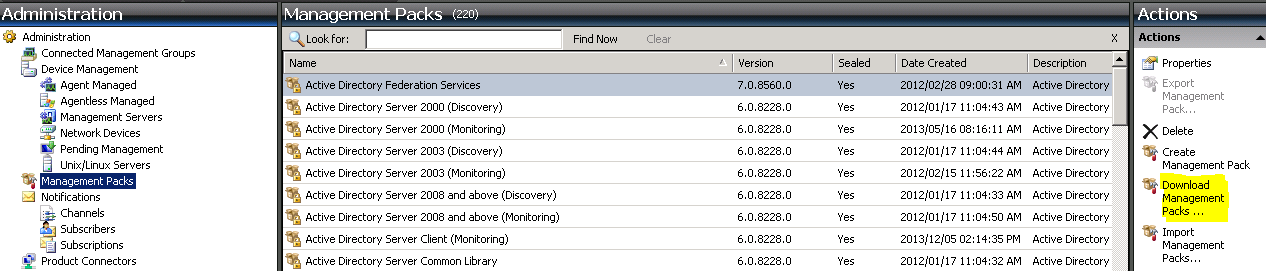
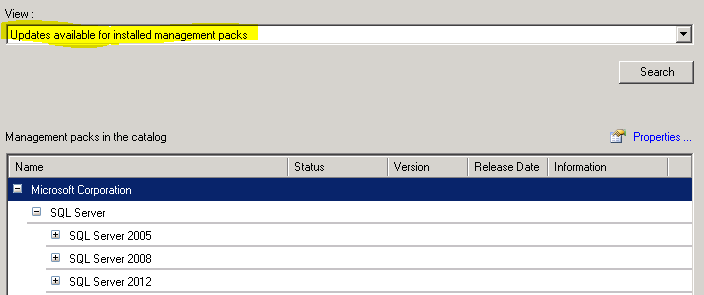
The easiest way to check MPs available through the catalog is to use the wizard in the SCOM console and search for “Updates Available for installed Management Packs”
In my experience once you have found a new version of a particular MP has been released it is always a good idea to download the MSI from the relevant site instead of using the wizard. This is because if a new management pack has been added to the package that wasn’t there in the previous version then you will not detect it as an update for an installed Management Pack.
If you have management packs not available through the catalog then they unfortunately need to be checked against the latest version at the vendor site manually.
Remember: If possible always test before deploying a new version of a management pack, if you don’t have access to a lab then an alternative is to keep an eye on community blogs and sites like System Center Central and MP Wiki, to see if any issues crop up.
If you have a good method for keeping your management packs up to date leave a comment.
Just a quick note on the new AD management pack that was released with the 2012 R2 wave.
I noticed when using the console to check management pack versions and selecting “Show me updates for management packs I currently have installed” that the 6.0.8228.0 version of the AD management pack does not appear. This particular environment was SCOM 2007 R2 CU6
Has anyone else experienced this? Leave a comment.