Veeam has released a new version of their popular Report Library for System Center, this version, 7.0 R2 follows the release of the hyper-v enabled Veeam Management Pack v7 for System Center and is available for download here.
The Veeam Report Library for System Center includes:
Veeam Alert History Report – shows information on alerts raised for infrastructure objects across a time range.
Veeam Performance Report – aggregates historical data to show performance counter values on one or more charts and tables.
Veeam Performance Details Report – aggregates historical data to show performance counter values with drill down for data.
Veeam Generic Performance Top (Bottom) N Report – aggregates historical performance data to show top or bottom N infrastructure objects, performance counters, or both, for a specific rule.
Veeam Relationship History Report – allows you to choose a specific type of relationship between infrastructure objects and track changes for this relationship over a time interval.
Veeam State Summary Report – shows the time in healthy/unhealthy state for selected infrastructure objects’ monitor across a time range.
December is quite an eventful month for Management Pack updates, IBM has just released version 2.3.0 of their IBM Storage Management Pack. As always it is available for download on the IBM Fix Central website (www.ibm.com/support/fixcentral).
This update adds support for the XIV multi-tenancy feature:
Enhancement: Added support for the XIV multi-tenancy feature, which applies only to XIV microcode version 11.5 or later (non-domain users have access only when the access policy is set to “Open”).
Fixed: For SAN Volume Controller and Storwize systems, cluster monitoring is dependent on FlashCopy® consistency group unit monitoring, while single system monitoring is dependent on array unit monitoring. If either of the required unit monitoring is not used, the cluster or system monitoring returns to the uninitialized state.
Fixed: Updated the IBM Storage Solutions External Runtime Components (previously named “XPyV”) to version 1.4.4 to resolve man-in-the-middle (MITM) security attacks.
As always test, test, test and read the guide before implementing, especially if you are upgrading from version 1.1.1.
An updated version of the SQL Server Management Pack was released this week, the new version is 6.5.4.0. This updated focuses on minor improvements and fixes.
They are available for download at the following links:
A new version of the Exchange 2010 MP was released during this months wave of updates, the new version is 14.3.210.2 and it is available for download here. It addresses a particular issue related to Exchange 2010 servers running Powershell 2.0 side by side with Powershell 3.0+.
Updated in this version:
Added a new MSI(Exchange2010PowershellFix) that should be used if the management pack doesn’t work on an Exchange 2010 server that has Powershell 2.0/3.0+ installed side by side. Please refer to the “Changes included in 14.3.210.2 (PS 3.0+ Update)” section for more information.
The Exchange2010PowershellFix.msi is also available for download at the same location here.
Extract from the guide:
Exchange 2010 MP versions 14.03.0038.004 and earlier required ONLY Powershell 2.0 to be installed on the Exchange server for it to work. When Powershell 3.0 or higher is installed on Exchange 2010 servers that were working with only Powershell 2.0 installed, Exchange MP stops working.
The new MSI (Exchange2010PowershellFix.MSI) that has been included in this release enables Exchange 2010 MP to work on servers that have Powershell 2.0 installed side by side with Powershell 3.0+. This new MSI should be used only if your existing Exchange 2010 MP isn’t able to monitor your Exchange 2010 server that has Powershell 2.0 and Powershell 3.0+ installed side by side. This will NOT work if the server has only Powershell 3.0 or higher installed.
If you already have 14.03.0038.004 installed, please execute the 14.3.210.2 “Exchange2010PowershellFix” MSI and import the MP’s contained within it.
Note: You must install the 14.03.0038.004 package (Exchange2010ManagementPackForOpsMgr2007-x64.msi/ Exchange2010ManagementPackForOpsMgr2007-x86.msi) prior to applying the 14.3.210.2 update (Exchange2010PowershellFix) in order for the Exchange 2010 MP to function correctly.
Microsoft has just released a new version of the Exchange 2013 MP it is now on version 15.0.663.19 and is available for download here.
This version seems to contain primarily bug fixes. Hopefully is an indication of the quality of management packs we will be receiving in the coming year. It’s good to see MS stepping up their game.
Changes in this version:
Added support for 2012 SP1
Fixed a bug on visualization error when localized Operations Console is used
Added details to the ‘Stored Procedure Not Found’ exception for additional context
A new version of the Base OS MP has been released, it is now on version 6.0.7279.0 and is available for download here. The fixes in this version primarily center around mount points.
Changes in version 6.0.7292.0
Mount point Names have been changed from GUIDs to a friendly drive letter name
Fixed performance collection workflows that were failing for some mount points
Fix was made to include Mount points without a drive letter name
Microsoft has released an updated System Center 2012 Management Pack for Microsoft Windows Server File & iSCSI Services 2012 it is now on version 7.1.10100.0 and is available for download here.
System Center 2012 Management Pack for Microsoft Windows Server File & iSCSI Services 2012. This version of Management Pack for File Server 2012 includes the following changes:
DeDuplication – Stay current
FSRM
Support for clustered namespaces
Support for clustered replication group members
Agentless monitoring
More detailed product knowledge
Support for clustered replication group members
Agentless monitoring
iSCSI – iSCSI Target is built inbox first time in Server 2012. This is the first version integrated with File Server.
Microsoft has released a new version of several SQL Management Packs, they are now on version 6.5.2.0 and are available for download at the links below:
SQL Server Reporting Services
SQL Server 2008 Reporting Services – Available here
SQL Server 2012 Reporting Services – Available here
SQL Server 2014 Reporting Services – Available here
SQL Server Analysis Services
SQL Server 2012 Analysis Services – Available here
SQL Server 2014 Analysis Services – Available here
This version of the SQL Server Analysis Services management packs contain several new features:
New features
New version of Generic Presentation Management Pack has been introduced
Summary dashboard for SQL Server Analysis Services 2012 Instances with drill-down to SQL Services Analysis Services 2012 Database dashboard
Summary dashboard for SQL Server Analysis Services 2012 Databases
Cross-version views
CPU utilization monitoring scenario on SSAS Instance level
New performance collection rules are introduced:
SSAS 2012: Database Disk Free Space (GB)
SSAS 2012: Database Drive Space Used By Others (GB)
SSAS 2012: Cache Evictions/sec
SSAS 2012: Cache Inserts/sec
SSAS 2012: Cache KB added/sec
SSAS 2012: CPU utilization (%)
SSAS 2012: Processing Rows read/sec
SSAS 2012: Storage Engine Query Rows sent/sec
Improvements:
Icons for various classes are updated
Performance counters object names are updated
Fixes:
An issue related to the discovery of a non-cluster instance on a cluster virtual node is fixed
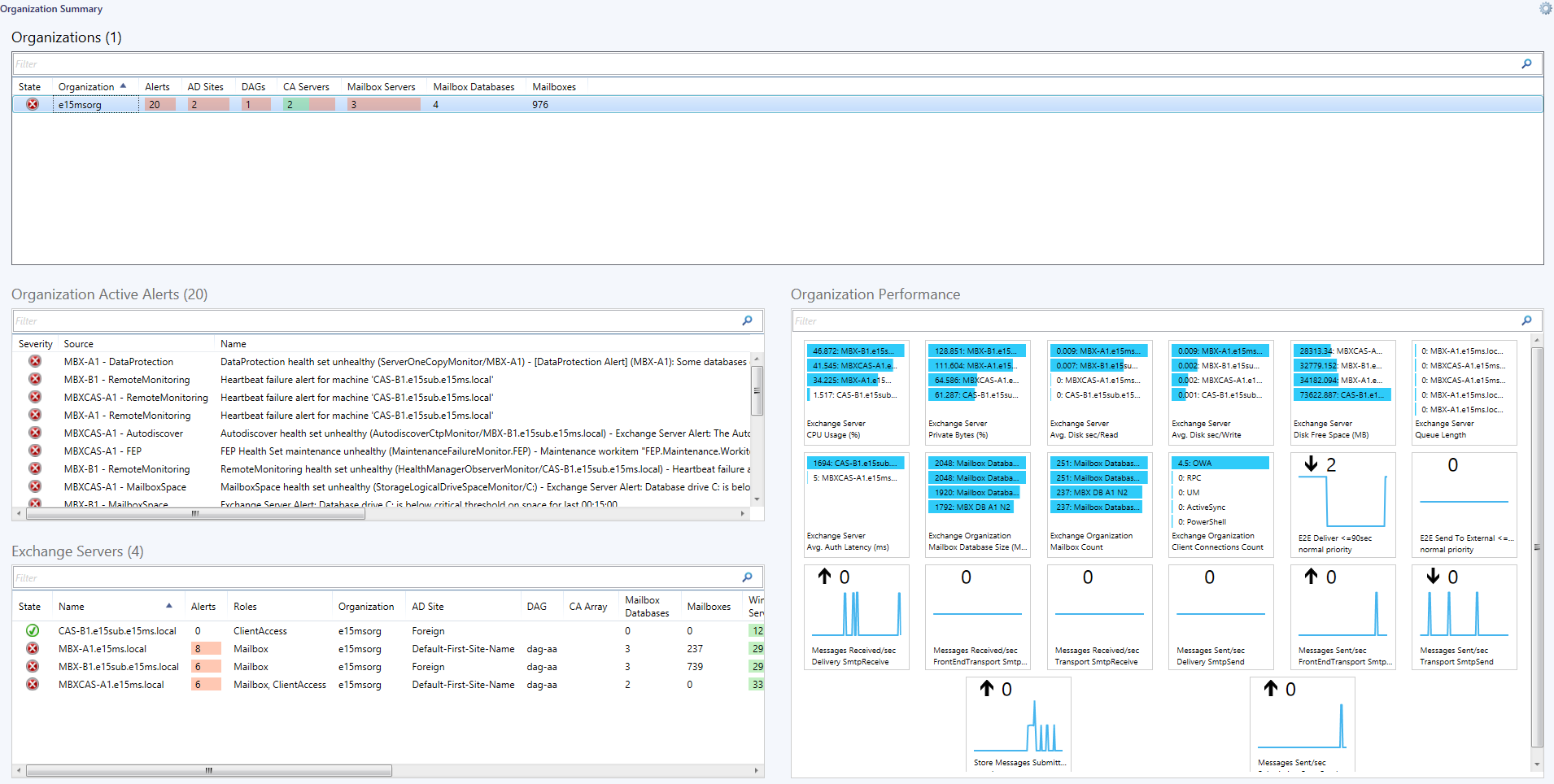
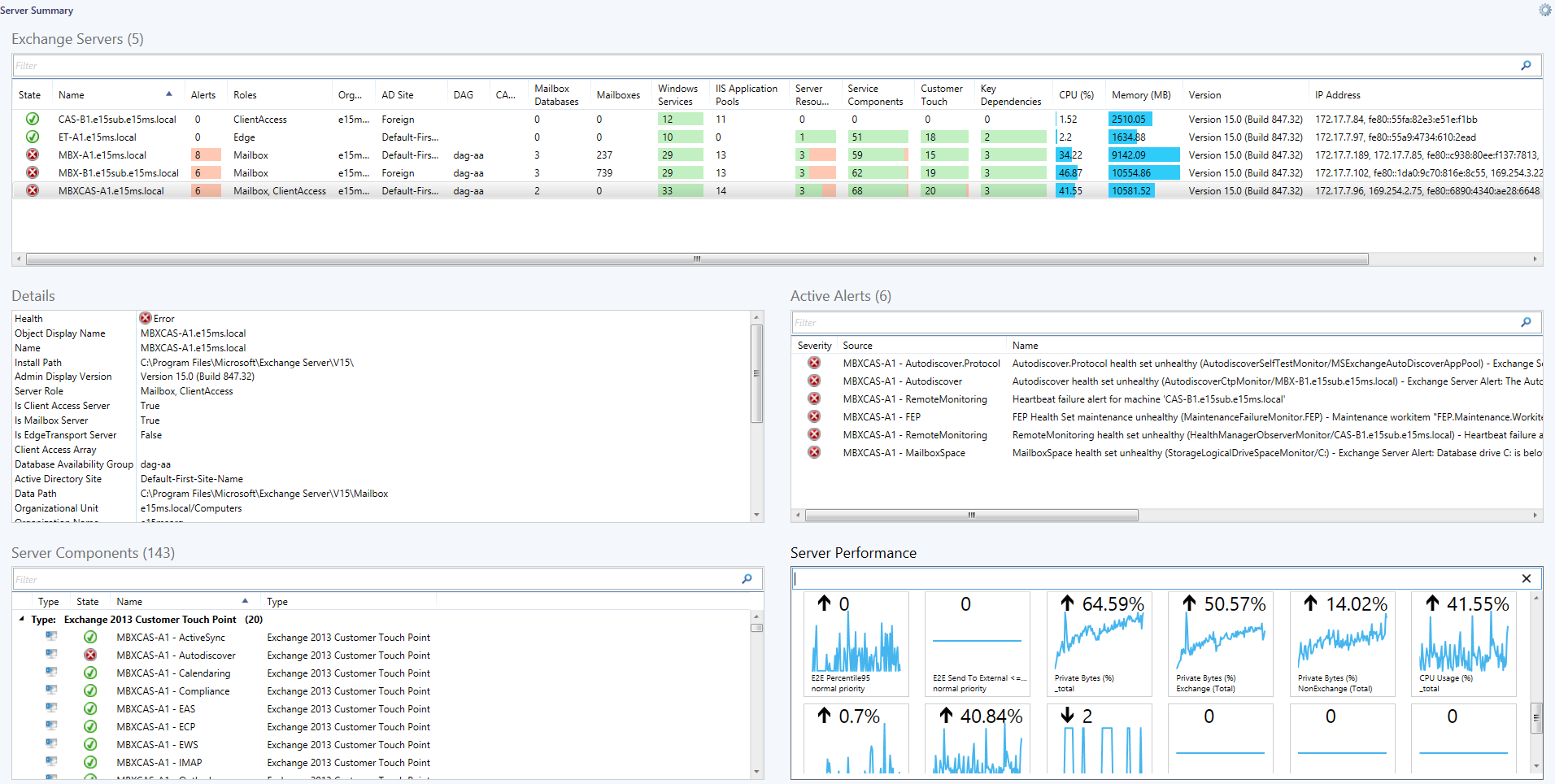
The original version of the Exchange 2013 Management pack was quite feature poor and didn’t have any performance collection. It’s great to see that Microsoft is listening to the needs of its customers and has added features and generally improved this management pack over all.
Version 15.0.652.19 includes performance collection rules which were missing from the previous version as well as new views, group, dashboard and reporting.
The performance collections rules that are now included are listed below, as extracted from the MP guide:
Exchange 2013 Server o Exchange 2013 Database: I/O Database Reads Average Latency (ms)
o Exchange 2013 Database: I/O Database Writes Average Latency (ms)
o Exchange 2013 Database: I/O Log Reads Average Latency (ms)
o Exchange 2013 Database: I/O Log Writes Average Latency (ms)
o Exchange 2013 Database: Page Fault Stalls/sec
o Exchange 2013 Server: Average Disk sec/Read
o Exchange 2013 Server: Average Disk sec/Write
o Exchange 2013 Server: Disk Free Space (MB)
o Exchange 2013 Server: Disk Reads/sec
o Exchange 2013 Server: Disk Size (MB)
o Exchange 2013 Server: Disk Writes/sec
o Exchange 2013 Server: Transport Queue Database Size (MB)
o Exchange 2013 Server: Client Connections Count
o Exchange 2013 Server: ActiveSync Pending
o Exchange 2013 Server: Avg. Authentication Latency (ms)
o Exchange 2013 Server: E2E Deliver <=90sec
o Exchange 2013 Server: E2E Latency Percentile 95
o Exchange 2013 Server: E2E Latency Send to External <=90sec
o Exchange 2013 Server: EWS Response Time (ms)
o Exchange 2013 Server: LDAP Search Time (ms)
o Exchange 2013 Server: Messages Received/sec
o Exchange 2013 Server: Messages Sent/sec
o Exchange 2013 Server: Outstanding Proxy Requests
o Exchange 2013 Server: HTTP Proxy Failure Rate (%)
o Exchange 2013 Server: HTTP Proxy Requests/sec
o Exchange 2013 Server: Queues by Type Count
o Exchange 2013 Server: Queue Length
o Exchange 2013 Server: Requests/sec
o Exchange 2013 Server: Avg RPC Latency (ms)
o Exchange 2013 Server: SMTP Bytes Received/Sec
o Exchange 2013 Server: SMTP Bytes Sent/Sec
o Exchange 2013 Server: SMTP Connections (Current)
o Exchange 2013 Server: Store Messages Submitted/sec
o Exchange 2013 Server: System Total Memory (MB)
o Exchange 2013 Server: CPU Utilization (%)
o Exchange 2013 Server: Private Memory Size (MB)
o Exchange 2013 Server: Private Memory Size (%)
Exchange 2013 Windows Service
o Exchange 2013 Windows Service: CPU Utilization (%)
o Exchange 2013 Windows Service: Pool Non Paged Memory Size (MB)
o Exchange 2013 Windows Service: Pool Paged Memory Size (MB)
o Exchange 2013 Windows Service: Private Memory Size (MB)
o Exchange 2013 Windows Service: Private Memory Size (%)
Exchange 2013 IIS Application Pool
o Exchange 2013 IIS App Pool: Active Requests
o Exchange 2013 IIS App Pool: Private Memory Size (%)
o Exchange 2013 IIS App Pool: CPU Utilization (%)
o Exchange 2013 IIS App Pool: Pool Non Paged Memory Size (MB)
o Exchange 2013 IIS App Pool: Pool Paged Memory Size (MB)
o Exchange 2013 IIS App Pool: Private Memory Size (MB)
Exchange 2013 Mailbox Database Copy
o Exchange 2013 Mailbox Database: Available Space (MB)
o Exchange 2013 Mailbox Database: Index Size (MB)
o Exchange 2013 Mailbox Database: I/O Database Reads Average Latency (ms)
o Exchange 2013 Mailbox Database: I/O Database Writes Average Latency (ms)
o Exchange 2013 Mailbox Database: I/O Log Reads Average Latency (ms)
o Exchange 2013 Mailbox Database: I/O Log Writes Average Latency (ms)
o Exchange 2013 Mailbox Database: Transaction Log Available Space (MB)
o Exchange 2013 Mailbox Database: Transaction Log Size (MB)
o Exchange 2013 Mailbox Database: Database Page Fault Stalls/sec
o Exchange 2013 Mailbox Database: Database Size (MB)
Exchange 2013 Organization
o Exchange 2013 Organization Synthetic: Mailbox Count
o Exchange 2013 Organization Synthetic: Client Connections Count
o Exchange 2013 Organization Synthetic: E2E Deliver <=90sec
o Exchange 2013 Organization Synthetic: E2E Latency Send to External <=90sec
o Exchange 2013 Organization Synthetic: Mailbox Database Size (MB)
o Exchange 2013 Organization Synthetic: Messages Received/sec
o Exchange 2013 Organization Synthetic: Messages Sent/sec
o Exchange 2013 Organization Synthetic: Store Messages Submitted/sec
The new dashboards look to be quite useful containing an Organisational Overview and Server overview, which should be useful to the support team. I hope this is an example of the type of content we can expect to see in future management packs.