Tag Archives: #2012

SCOM: Updated SQL management packs v 6.6.0.0

Microsoft has released updates of all of their SQL management packs to version 6.6.0.0, they are available for download at the links below, a brief what’s new is below the download links:

SQL Server 2005, 2008, 2008 R2, and SQL Server 2012 – Here
SQL Server 2014 – Here
SQL Server 2008 Analysis Services – Here
SQL Server 2012 Analysis Services – Here
SQL Server 2014 Analysis Services – Here
SQL Server 2014 Reporting Services (Native Mode) – Here
SQL Server 2012 Reporting Services (Native Mode) – Here
SQL Server 2008 Reporting Services (Native Mode) – Here

What’s new in 6.6.0.0

All of the management packs have had their dashboards replaced with new ones and the SQL Server management packs have the following additional updates:
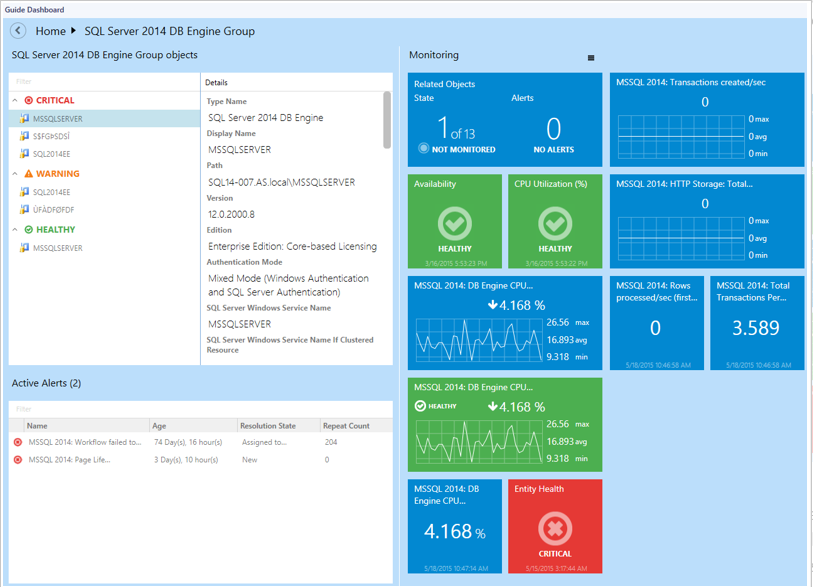
newsqldashboard

SQL Server 2005, 2008, 2008 R2, and SQL Server 2012 v 6.6.0.0

  • Dashboards were replaced with the new ones
  • Components of replication functionality are deprecated and disabled by default
  • SPN monitor now correctly handles disjoined namespaces
  • Added support for filegroups containing filestreams and partition schemes
  • Memory Consumption monitor has been fixed
  • Upgradeability from 6.4.1.0 version is supported
  • Added CPU Usage monitor and rule for SQL Server 2005
  • Added ConsecutiveSamples Condition to the Buffer Cache Hit Ratio and Page Life Expectancy monitors
  • AlwaysOn discovery was reworked
  • Minor fixes.

SQL Server 2014 v 6.6.0.0

  • Dashboards were replaced with the new ones
  • SPN monitor now correctly handles disjoined namespaces
  • Added support for filegroups containing filestreams and partition schemes
  • Localization packs now works with the MP
  • Memory Consumption monitor has been fixed
  • Upgradeability from 6.4.1.0 version is supported
  • Added ConsecutiveSamples Condition to the Buffer Cache Hit Ratio, Page Life Expectancy, Transaction Log Free Space (%) and Resource Pool Memory Consumption monitors
  • AlwaysOn discovery was changed
  • Minor fixes.

sqlserver

Loading

SCOM: Updated Management Pack for Windows Azure Pack (WAP) V2

Oskar Landman has released an update for his community Management Pack for Windows Azure Pack. Version 2 can be downloaded here.

“This Management pack is written to monitor the health of your windows azure pack environment.”

New in this version:
NB. this version is NOT upgradable from V1.

  • Update the entire pack and have written some knowledge to some monitors to give more details on what is being monitored and why.
  • Another addition is now the pack is supported on WAP environments which have the roles separated.
  • Add some more visual stuff Icons
  • Added overrides to the web monitors where you can override the URL if necessary.
  • Plan and Subscription support.
  • Usage collection on Subscriptions

Loading

SCOM: Updated OpsLogix VMWare MP v1.3.0.98

OpsLogix has announced the release of their updated VMWare management pack. The new version is upgrade compatible with the previous release (v1.3.0.52). Visit their site for a quote.

New in this version:

  • Fixed bug for resource pool discovery events in eventlog
  • Fixed Hardware discovery 10000 event (long running discovery)
  • Fixed bug that causes all monitors to turn healthy when an additional vcenter is added to monitoring.
  • Various bug fixes to managed modules

Loading

SCOM: Updates PKI Certificate Verification MP – v1.3.0.0

One of the more popular community management packs has received an update, Raphael Burri’s PKI Certificate Verification MP is now on version 1.3.0.0 and can be downloaded from here.

New in this version:

  • Added Tasks: Archive Certificate, List Certificate Properties, Disable/Enable Monitoring, Rediscover
  • Added Recoveries: Archive Certificate, Disable Monitoring
  • Added Discovery: Web Hosting certificate store (Server 2012 / 2012 R2)
  • Additional certificate property: Certificate Template. It is also listed on reports.
  • Discovery filter expanded to certificate template.
  • Alert description: Additional details on the certificate chain and SCOM action account used.
  • CRL Lifetime Monitor: Threshold is exposed as an overridable parameter.
  • CRL health roll up monitor added.
  • Expiring certificate view & report: Default threshold of 1 month may be overridden.
  • Views: Changed criteria on views to make them more reliable when using user scopes.
  • Reporting bug: Certificate inventory did not list all certificates.
  • Additional MP: Rediscovery Tasks. Immediate trigger of store content discovery after archive, disable/enable or rediscover tasks

For a full explanation of these changed please visit the original article at Raphael Burri’s blog here

Loading

Cross post: Quick note on an issue you might encounter after installing Microsoft Security Update 3004375

A potential issue has been highlighted on the Microsoft Operating Manager Engineering Blog.

“We’ve seen an issue relating to 3004375 that occurs due to a regression, and while it’s already been fixed (by installing 3023562), we wanted to take a minute and let you know about some of the details in case you happen to see it. ”

Full details are available here

Short version: If you have KB3004375 installed on your management servers you may need to install KB3023562


Loading

SCOM: Updated NiCE MP Domino v7.01

NiCE has released an updated version of their Domino MP version 7.01 – more information is available here.

New in this version:

  • Major consolidation of hotfixes
  • Improved support for Domino Partitioned Servers
  • New version of the internal library MP
  • Various defect resolutions bug fixes for metric collection
  • Improvements on Domino Task monitoring

Loading

SCOM: Updated Windows Server Print Server MP v6.0.7294.0

Microsoft has released a new version of the Windows Server Print Server MP version 6.0.7294.0 is available for download here.

New in this version:

  • Version 6.0.7294 of the Management Pack for Windows Print Server supports Print Clusters.
  • Removed “Microsoft.Windows.Server.PrintServer.mp” since we have dropped support for Windows server 2003.  Please ignore all sections in this document related to Windows Server 2003 / Microsoft.Windows.Server.PrintServer.mp.

Kevin Holman has more in this management pack here with a  warning for those of you with large print environments.


Loading

SCOM 2012: Veeam announces beta for Veeam Management Pack v8

Veeam has announced the beta for version 8 of their Veeam Management Pack for System Center.

v8 is available for download here.

Here is a brief rundown of the new features in addition to overall tuning and general improvements :

Sphere 6.0 support – pretty much self explanatory

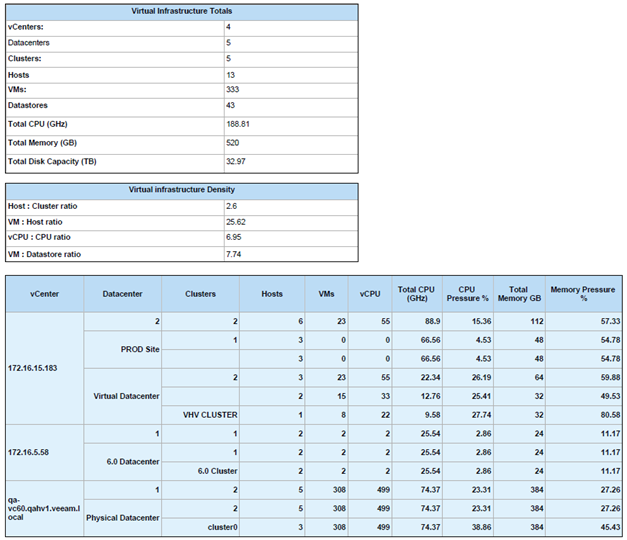
The Morning Coffee report – Veeam MP’s new Infrastructure Summary report provides a single overview report to check the status of the entire environment.

image1


Hybrid Cloud Capacity Planning report  – The report now offers updated analytics with improved logic and accuracy.

Checkpoint/vSphere snapshot tracking – Now includes a heatmap to assist in quickly identifying storage-related performance issues across the entire virtual environment

Support for SMB shares for Hyper-V – SMB shares can now be seen in the Storage Topology view, with drill-down to the virtual machine (VM) level.

For more information check out Veeams site.

Loading

SCOM: Database Status Report version 3

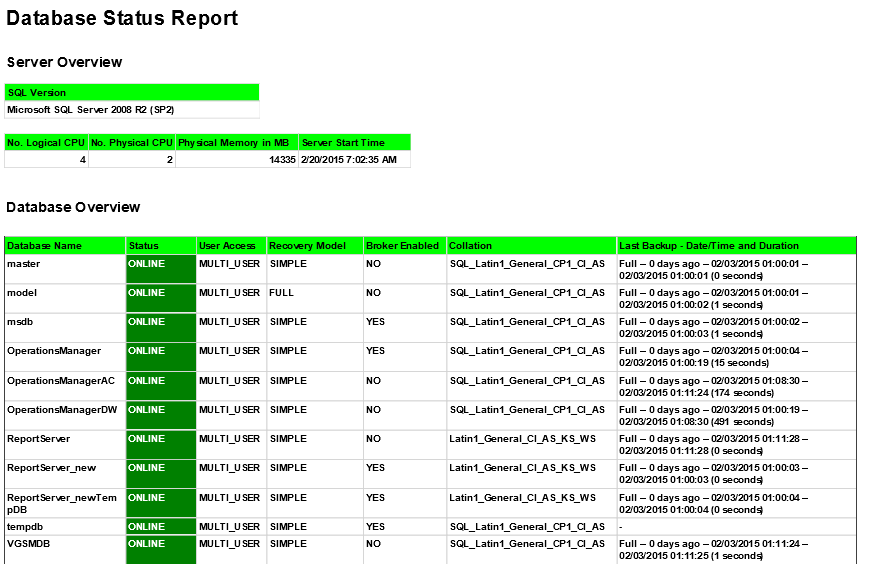
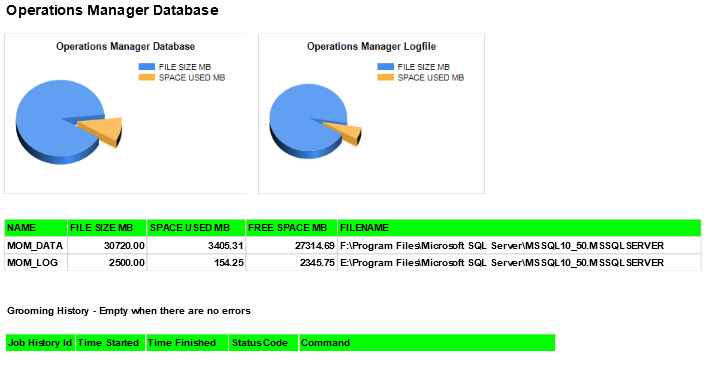
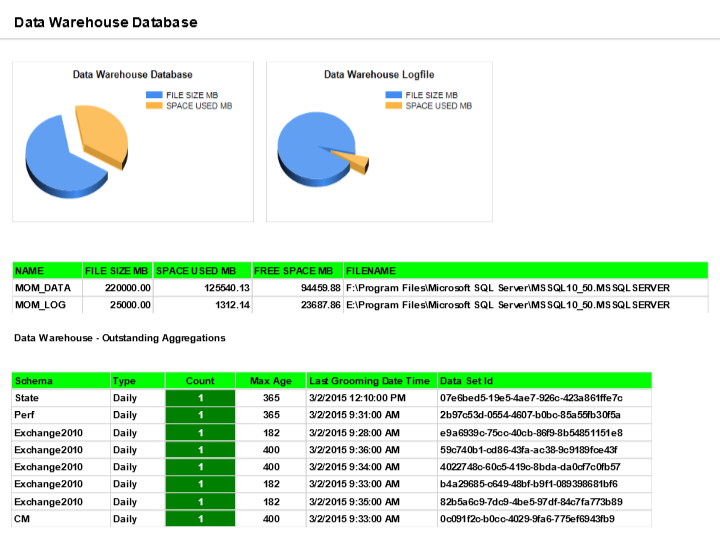
Last month I blogged about a SCOM Database Status Report that I was working on in order to get a single page overview of the SQL environment for a SCOM implementation, as a starting point to a complete SCOM heath report.

Below are samples of version 3 of the report which now includes additional sections for the OperationsManager database as well as the Data Warehouse. I have also amended some of the colouring to make important aspects easier to identify.

db1 db2 db3


I would be interested to hear from anyone who has any comments or suggestions on this report or ideas for future ones.

Loading

XPost: Creating dynamic groups for objects which exist behind a gateway in OpsMgr

Cameron Fuller said it best “Even when you spend years working on a specific technology occasionally you are pleasantly surprised to find out that something already exists in the product but you are unaware of it.”

He has written an article which is available here which describes the use of the /SiteName switch when approving a gateway in order to automatically create and populate a group containing all devices being managed by that gateway.

This is certainly a useful feature.

Note – If you use the /sitename switch then bookmark this article by Brian McDermott – How to remove an OpsMgr 2012 Gateway Server that is associated with a site to prevent some future headaches.


Loading