If you ever need to test Application insights or any of the other Azure features that need an application such as Front Door there is a simple way to create a test application baked into Azure.
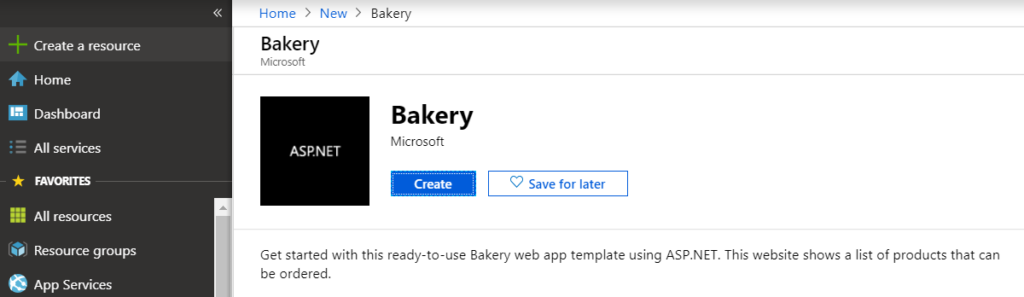
In your Azure portal simple click on “New Resource” and search for Bakery and click Create
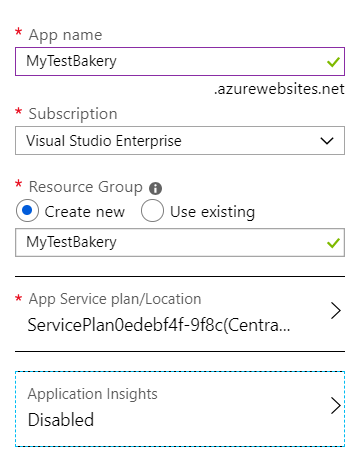
Now give the App a name, choose your subscription, resource group and an applicable App Service Plan. Remember the more robust the plan the higher the cost, there is a free limited Tier available called F1 Shared. Then click Create.
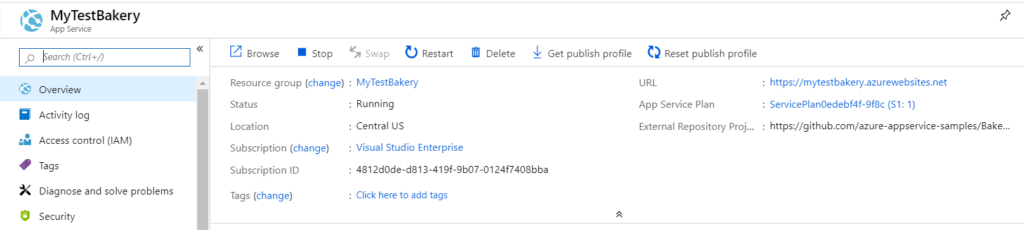
After a few minutes your application will be deployed and ready for use with Azure Features. select App Services in your Azure Portal and then click on your Bakery Application
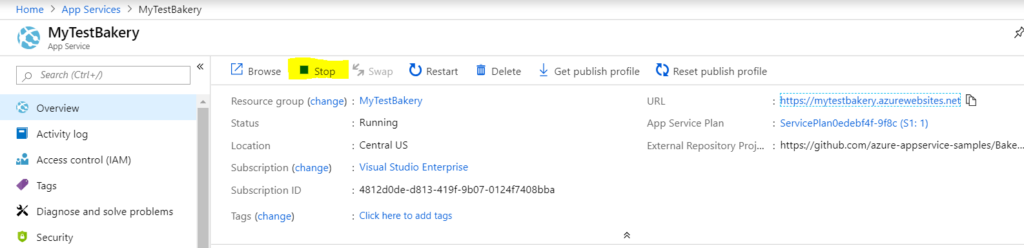
You can find the URL for your new site at the top right of the Overview blade.
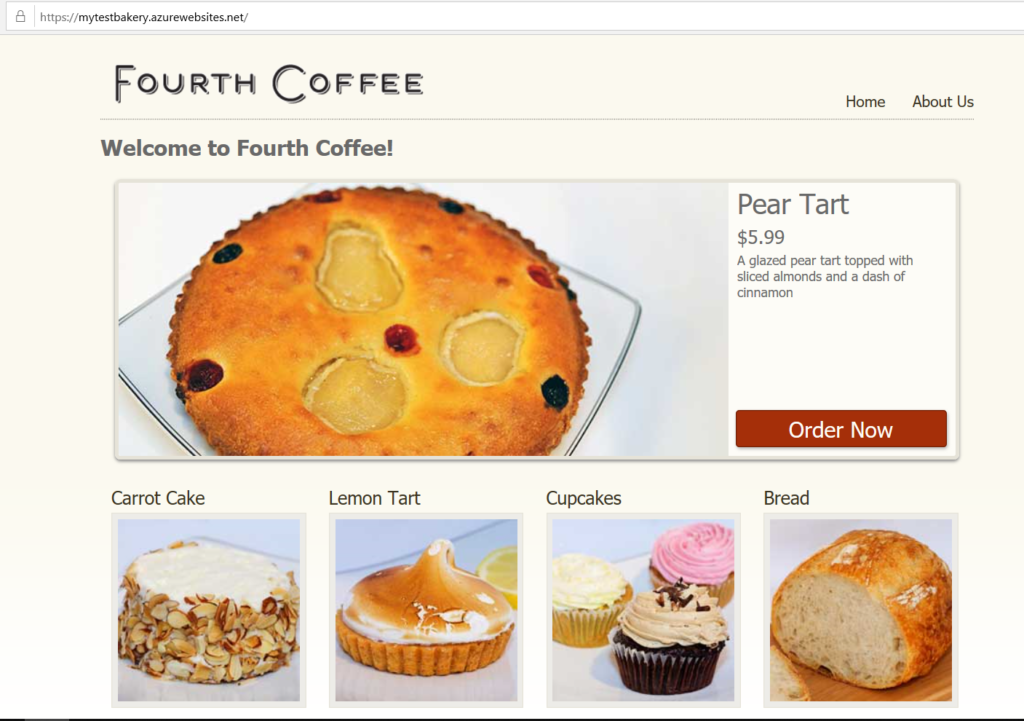
Browsing the URL you should see the below site.
For an extra tip if you need the site again you can turn it off instead of deleting it to save some costs. Just press stop in the application overview.
A new feature in Azure, Workbooks combine text, Analytics queries, Azure Metrics, and parameters into rich interactive reports.
For those of your familiar with SCOM, think of workbooks as a pre-bundled set of metrics similar to the dashboards you are already familiar with. It offers a simple method to share useful dashboards which can also be copied and exported.
Let’s dive right in.
So how do I find them?
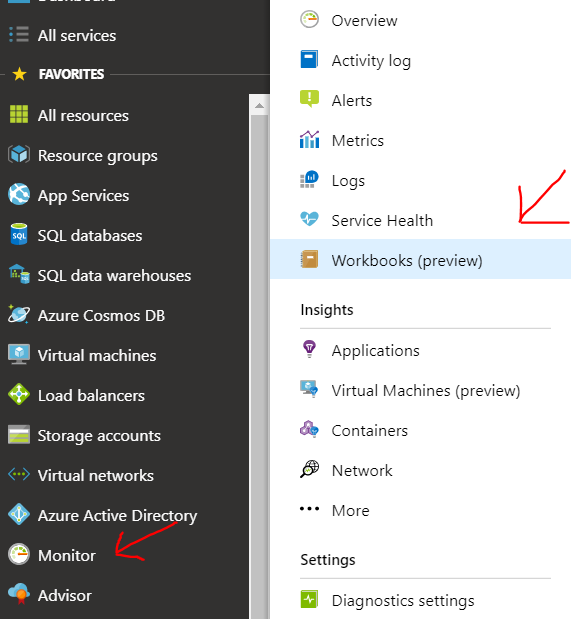
Simply navigate to Monitor in the Azure portal and click on Workbooks, currently in preview at the time of this article.
Whats available currently?
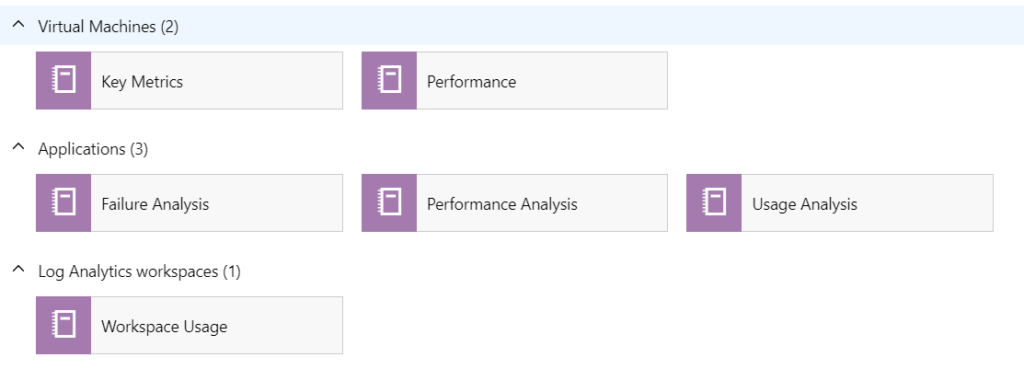
There are several pre-build templates out of the box as well as a GIT available as a repository for additional templates.
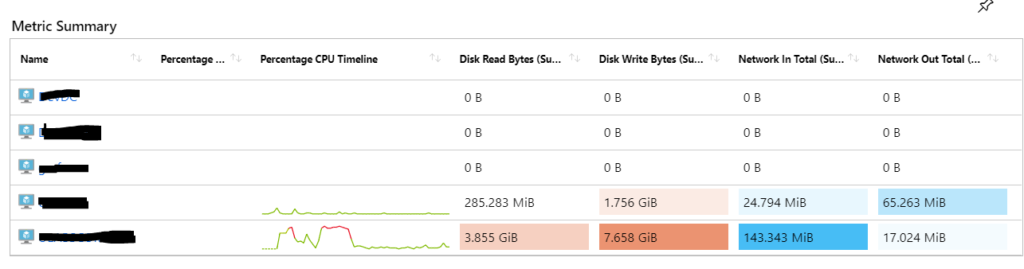
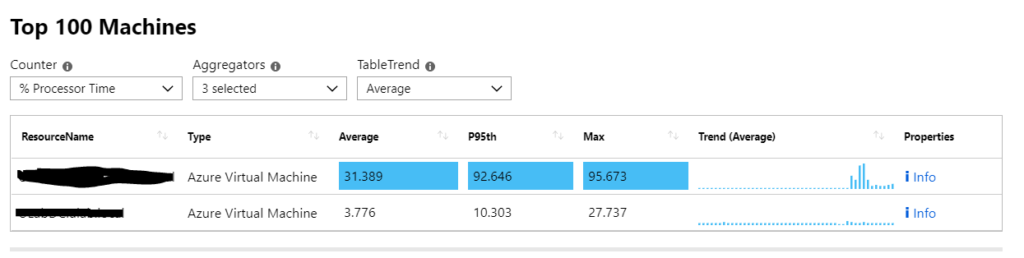
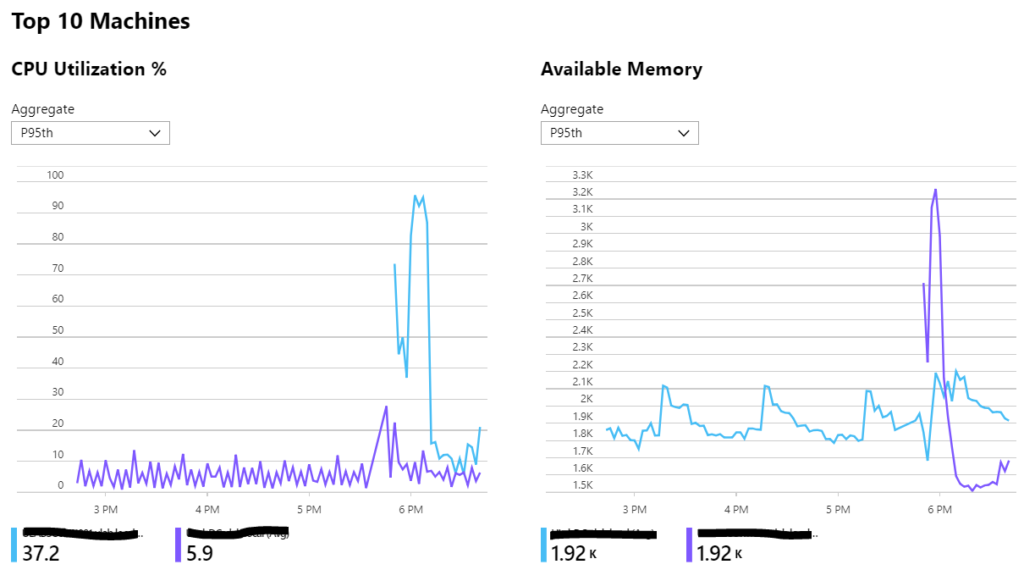
VM Metrics Example
Below are several sample outputs of the various workbooks, not only do they look good but they also contain rich useful information on every object in your subscription that is metric enabled.
Update rollup 7 for SCOM is now available as usual you can get it through windows update or here
How to guide – here note the known issues and slight change to getting started.
A decent update with quite a few fixes listed below:
Improvements and issues that are fixed
Fixed: Cannot use SQLOleDB.dll to probe databases like Oracle/MySQL.
Improved the performance of SCOM console in listing the groups.
Operations Manager grooms out the alert history only on an alert closure.
Agents by Health State report shows duplicate agent names.
Users of a scoped group are not able to use the Console.
Fixed an issue that prevented addition of a group in the Storage Spaces Direct 2016 management pack dashboard.
SCOM Network Device Re-Discovery now probes for SNMP V3 devices too.
Fixed re-registering for SNMP Traps in the Proxy Management Server.
Windows Computer Property “NetbiosDomainName” is not discovered properly.
SCOM console crashes while trying to connect to Azure Log Analytics and Azure Monitor.
Linux agent is not able to get the correct version and port details for JBoss EAP 7.1.
An issue that lead to creation of multiple empty temp files in the /tmp directory of Linux servers has been fixed.
Fixed the formatting issue with the output for the task ‘Top10 CPU Processes’ when using Windows Management Infrastructure (MI) APIs.
XPlat agent now supports monitoring of SUSE-11 SP4 platform with Security Module installed on it for TLS 1.2 compliance.
Fixed an issue that caused the corruption of /etc/login.cfg file on AIX 7 machines during install/upgrade of the agent.
AIX Agent is now transitioned to 64-bit package to accommodate more stack and heap space if needed to avoid any stack/heap overflow which occasionally leads to heartbeat failure.
Free memory calculation accommodated appropriately on RHEL-7 platform.
It’s been a little while since we’ve talked about the IBM Storage MP and there have been some improvements, as always you can get it here but remember you will need the serial number of your IBM device in order to download.
So what’s new?
Version 2.7.0 adds support for Microsoft System Center Operations Manager 2016 and the following storage system releases:
IBM FlashSystem® A9000 versions 12.0.x, 12.1.x, and 12.2.x
IBM FlashSystem A9000R versions 12.0.x, 12.1.x, and 12.2.x
IBM® Storwize® V3500 versions 7.8 and 8.1.x
IBM Storwize V3700 version 7.8 and 8.1.x
IBM Storwize V5000 version 7.8 and 8.1.x
IBM Storwize V7000 version 7.8 and 8.1.x
IBM SAN Volume Controller version 7.8 and 8.1.x
IBM FlashSystem V9000 7.8 and 8.1.x
IBM DS8880 8.2 and 8.3
This version also includes the following enhancement:
The following properties have been added to the IBM Storage Management Pack for Microsoft System Center Operations Manager user interface for the IBM Spectrum Virtualize™ Family management pack to make it easier to distinguish between different IBM Spectrum Virtualize Family storage systems being managed:
code_level: The software release version on the storage system being managed.
product_name: The IBM product name of the storage system being managed.
With HTML5 dashboards and drill down experiences in the SCOM web console, you will now be able to use a simplified layout and extend the monitoring console using custom widget and SCOM REST API.
Taking modernization a step further, email notifications in SCOM have been modernized as well with support for HTML-email in SCOM 2019.
SCOM 2019 brings a new alerts experience for monitor-based alerts whereby alerts have to be attended to and cannot be simply closed by operators when the respective underlying monitors are in unhealthy state.
SCOM has enhanced your Linux monitoring by leveraging Fluentd; and now is resilient to management server failovers in your Linux environments.
All the SCOM management packs will now support Windows Server 2019 roles and features.
With Service Map integration with System Center Operations Manager (SCOM), you can automatically create distributed application diagrams in Operations Manager (OM) that are based on the dynamic dependency maps in Service Map.
With Azure Management Pack, you can now view perf and alert metrics in SCOM, integrate with web application monitoring in Application Insights, and monitor more PaaS services, such as Azure Blob Storage, Azure Data Factory, etc.
Important changes to release cadence
Finally, we are making changes to System Center release cadence to optimize the way we are delivering new features. System Center has two release trains today – LTSC and SAC. There is also a release train called Update Rollups (URs).
Most of our customers use Long Term Servicing Channel (LTSC) like System Center 2016 to run their data center infrastructures. LTSC provides five years of mainstream support and five years of extended support – with Update Rollups (UR) providing the incremental fixes and updates. From talking to customers, we learned that LTSC works better for most System Center deployments as the update cycles are longer and more stable.
Based on the learnings, we will start to focus our resources on innovation plans for System Center in LTSC releases and stop SAC releases. System Center 2019 will support upgrades from two prior SAC releases so customers running System Center 1801 or System Center 1807 will be able to upgrade to System Center 2019; just as System Center 2016 can be upgraded to System Center 2019.