Tag Archives: #2012 R2

SCOM: Report subscription list could not be loaded. Client found response content type of ”, but expected ‘text/xml’.

Just the thing you want to see on a Monday morning, clicking on the Reports node and seeing the following error:

Message: Report subscription list could not be loaded.

System.InvalidOperationException: Client found response content type of ”, but expected ‘text/xml’.
The request failed with an empty response.
at System.Web.Services.Protocols.SoapHttpClientProtocol.ReadResponse(SoapClientMessage message, WebResponse response, Stream responseStream, Boolean asyncCall)
at System.Web.Services.Protocols.SoapHttpClientProtocol.Invoke(String methodName, Object[] parameters)
at Microsoft.EnterpriseManagement.Mom.Internal.UI.Reporting.ReportingService.ReportingService2005.ListSubscriptions(String Report, String Owner)
at Microsoft.EnterpriseManagement.Mom.Internal.UI.Reporting.ManagementGroupReporting.GetSubscriptions(String owner)
at Microsoft.EnterpriseManagement.Mom.Internal.UI.Reporting.Views.ReportSubscriptionsView.ReportSubscriptionsView.LoadSubscriptionsJob(Object sender, ConsoleJobEventArgs args)

An investigation determined that the reporting services action account needed to be re-registered to the ASP.NET IIS framework using the following command.

aspnet_regiis -ga <Domain\reporting services action account>

Loading

XPost: Event 18054 errors in the SQL application log

Here is a great post by Kevin Holman addressing an issue you would come across if you have had to move your SCOM databases or recover them to a new SQL server.

Sample error:

Log Name:      Application
Source:        MSSQL$I01
Date:          10/23/2010 5:40:14 PM
Event ID:      18054
Task Category: Server
Level:         Error
Keywords:      Classic
User:          OPSMGR\msaa
Computer:      SQLDB1.opsmgr.net
Description:
Error 777980007, severity 16, state 1 was raised, but no message with that error number was found in sys.messages. If error is larger than 50000, make sure the user-defined message is added using sp_addmessage.

In essence this happens, as explain, due to the sysmessages being created in the master database on installation. These messages will then be missing after a database move or new sql server recovery.

Kevin has also provided a script to re-add these messages for you here – CAUTION for SCOM 2012 R2 only

Loading

SCOM: Checking for a word on a webpage

Monitoring if a website is available is simple enough with the SCOM 2012 Web application availability wizard but what if you want to check if a specific word appears on that page?

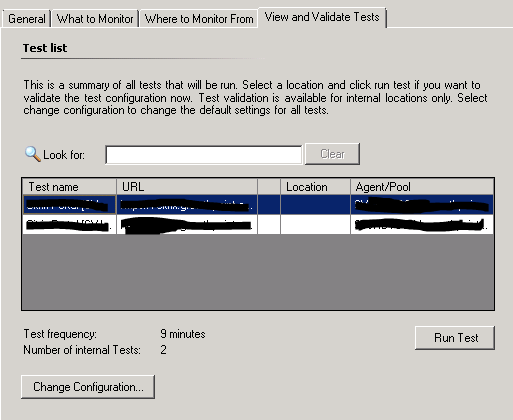
In order to add this additional criteria to your web application monitor first open your web app and click on Change Configuration:
webappconfig

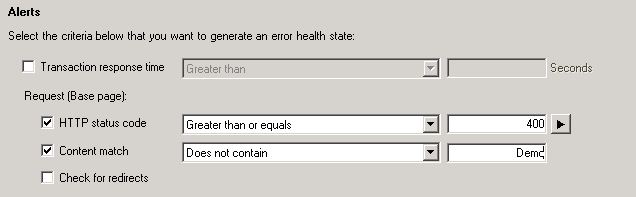
Then in the section titled alerts tick the box for Content Match, then choose if the word or phase you are looking for must be present or missing and type the word or phrase into the criteria box. In this example an alert will be generated if my page does not contain the word Demo.

webappconfig2

And there you have it a web application which will alert you if a word appears on a monitored web page.

Loading

SCOM 2012 R2: Update Rollup 9 has been released!

Update Rollup 9 for SCOM 2012 R2 has been released and contains a variety of fixes. As usual the update is available through windows update or in the download catalogue here.

As always test thoroughly before implementing in a production environment.

Issues that are fixed in this update rollup

  • SharePoint workflows fail with an access violation under APMA certain sequence of the events may trigger an access violation in APM code when it tries to read data from the cache during the Application Domain unload. This fix resolves this kind of behavior.
  • Application Pool worker process crashes under APM with heap corruptionDuring the Application Domain unload two threads might try to dispose of the same memory block leading to DOUBLE FREE heap corruption. This fix makes sure that memory is disposed of only one time.
  • Some Application Pool worker processes become unresponsive if many applications are started under APM at the same timeMicrosoft Monitoring Agent APM service has a critical section around WMI queries it performs. If a WMI query takes a long time to complete, many worker processes are waiting for the active one to complete the call. Those application pools may become unresponsive, depending on the wait duration. This fix eliminates the need in WMI query and significantly improves the performance of this code path.
  • MOMAgent cannot validate RunAs Account if only RODC is availableIf there’s a read-only domain controller (RODC), the MonAgent cannot validate the RunAs account. This fix resolves this issue.
  • Missing event monitor does not warn within the specified time range in SCOM 2012 R2 the first time after restartWhen you create a monitor for a missed event, the first alert takes twice the amount of time specified time in the monitor. This fix resolves the issue, and the alert is generated in the time specified.
  • SCOM cannot verify the User Account / Password expiration date if it is set by using Password Setting objectFine grained password policies are stored in a different container from the user object container in Active Directory. This fix resolves the problems in computing resultant set of policy (RSOP) from these containers for a user object.
  • SLO Detail report displays histogram incorrectlyIn some specific scenarios, the representation of the downtime graph is not displayed correctly. This fix resolves this kind of behavior.
  • APM support for IIS 10 and Windows Server 2016Support of IIS 10 on Windows Server 2016 is added for the APM feature in System Center 2012 R2 Operations Manager. An additional management pack Microsoft.SystemCenter.Apm.Web.IIS10.mp is required to enable this functionality. This management pack is located in %SystemDrive%\Program Files\System Center 2012 R2\Operations Manager\Server\Management Packs for Update Rollups alongside its dependencies after the installation of Update Rollup 9.

    Important Note One dependency is not included in Update Rollup 9 and should be downloaded separately:

    Microsoft.Windows.InternetInformationServices.2016.mp

  • APM Agent Modules workflow fail during workflow shutdown with Null Reference ExceptionThe Dispose() method of Retry Manager of APM connection workflow is executed two times during the module shutdown. The second try to execute this Dispose() method may cause a Null Reference Exception. This fix makes sure that the Dispose() method can be safely executed one or more times.
  • AEM Data fills up SCOM Operational database and is never groomed outIf you use SCOM’s Agentless Exception Monitoring to examine application crash data and report on it, the data never grooms out of the SCOM Operational database. The problem with this is that soon the SCOM environment will be overloaded with all the instances and relationships of the applications, error groups, and Windows-based computers, all which are hosted by the management servers. This fix resolves this issue. Additionally, the following management pack’s must be imported in the following order:
    • Microsoft.SystemCenter.ClientMonitoring.Library.mp
    • Microsoft.SystemCenter.DataWarehouse.Report.Library.mp
    • Microsoft.SystemCenter.ClientMonitoring.Views.Internal.mp
    • Microsoft.SystemCenter.ClientMonitoring.Internal.mp
  • The DownTime report from the Availability report does not handle the Business Hours settingsIn the downtime report, the downtime table was not considering the business hours. This fix resolves this issue and business hours will be shown based on the specified business hour values.

    The updated RDL files are located in the following location:

    %SystemDrive%\Program Files\Microsoft System Center 2012 R2\Operations Manager\Server\Reporting

    To update the RDL file, follow these steps:

    1. Go to http://MachineName/Reports_INSTANCE1/Pages/Folder.aspxMachineName //Reporting Server.
    2. On this page, go to the folder to which you want to add the RDL file. In this case, click Microsoft.SystemCenter.DataWarehouse.Report.Library.
    3. Upload the new RDL files by clicking the upload button at the top. For more information, see https://msdn.microsoft.com/en-us/library/ms157332.aspx.
  • Adding a decimal sign in an SLT Collection Rule SLO in the ENU Console on a non-ENU OS does not workYou run the System Center 2012 R2 Operations Manager Console in English on a computer that has the language settings configured to use a non-English (United States) language that uses a comma (,) as the decimal sign instead of a period (.). When you try to create Service Level Tracking, and you want to add a Collection Rule SLO, the value you enter as the threshold cannot be configured by using a decimal sign. This fix resolves the issue.
  • SCOM Agent issue while logging Operations Management Suite (OMS) communication failureAn issue occurs when OMS communication failures are logged. This fix resolves this issue.

Loading

SCOM: Microsoft Dynamics NAV 2015 Management Pack for System Center

A management pack has been released to offer monitoring support for Microsoft Dynamics NAV 2015. It is available for download here.

This monitoring pack supports monitoring the health of Microsoft Dynamics NAV 2015 installations, including the following components:

  • Computers on which Microsoft Dynamics NAV Server is installed and Microsoft Dynamics NAV Server instances are installed.

This includes monitoring of Microsoft Dynamics NAV Server instances and mounted tenants.

  • Computers on which Microsoft Dynamics NAV Web Server components are installed. These include the websites and web server instances for the Microsoft Dynamics NAV Web client.

Loading

SCOM: Updated MP Windows 8 and 8.1 Client Operating System v6.0.7251.0

An updated version of the Client OS MP has been released, 6.0.7251.0 can be found here

New in this version:

  • Changed discovery of Win 8 client computer and Win 8 client OS data sources to fix the issue with discovering Win 10 computers by Win 8 MP. Instead of registry provider now we use registry and WMI to find version of the OS
  • Added Alert Messages to the following monitors: CPU Percentage Utilization, CPU DPC Time Percentage, CPU Percentage Interrupt Time
  • Added a group populator for Win 8.1 Business Critical group
  • Fixed Windows 8 Aggregate Physical Disk Discovery
  • Fixed Discover Network Adapters (Only Enabled) and Discover Network Adapters (Both Enabled and Disabled) discoveries

Fixed Windows 8 MP Aggregate reports failure issue occurring while running reports under standard service account by granting appropriate permissions in Install and Upgrade sections scripts of DW datasets

Loading