Tag Archives: #2012 R2

SCOM: Updated Windows Server MP v6.0.7297.0

Version 6.0.7297.0 of the Windows server management pack has been released and in available for download here.

Updates in this version:

  • In 2008, 2012 platforms, the “Logical Disk Free Space (%) Low” monitor do not alert as expected when free space is 0%. With this fix, this monitor will alert when free space is 0%
  • In all platforms, logical disks are un-discovered if we configure them as Asymmetric storage on Failover Cluster. With this fix, this issue will be resolved
  • The Windows Server OS Management pack collects logical disk size is megabytes. During discovery this value used to be assigned to integer property. When logical disk size is significantly large (for example, when disk is of several petabytes), in megabytes format it goes out of boundaries of integer type. As a result the workflow fails while trying to insert discovery data. To support large logical disk another double properties was introduced, since double type has much more wide values range. Old integer property with constant “-1” value is preserved for upgrade compatibility and marked as DEPRECETED
  • “Volume Mount Points on Dynamic Disks” aren’t discovered by Microsoft Windows Server 2012 Discovery MP. With this fix, this issue will be resolved
  • MP has been modified to not discover System Reserved volumes on Windows Server 2012 to ensure it is consistent with the rest of the OS versions

Loading

SCOM 2012 R2: Update Rollup 7

Microsoft has announced the release of U7 for SCOM 2012 R2, this update was originally delayed due to technical issues but is now available here:

This update contains many fixes which are listed below:

  • The home page link in the Web Console Noscript.aspx file is vulnerable to cross-site scripting (XSS)

    A security vulnerability exists in the Web Console for System Center 2012 R2 Operations Manager that could allow elevation of privilege if a user goes to an affected website by using a specially crafted URL. This fix resolves that vulnerability. For more information, see Microsoft Security Bulletin MS15-086.

  •  “Agents by Health State” report shows duplicate entries and inconsistent data

    Sometimes a single agent has multiple entries displayed in the “Agents by Health State” report. The fix for this issue makes sure the most recent state of the agent is displayed in the report.

  • Dependent tables are not groomed (Event.EventParameter_GUID table)

    The following issues are fixed:

    • In a database, the grooming of certain MT$X$Y tables were missed because of the filtering logic. Therefore, the tables were never groomed. There were scenarios in which lots of unwanted data was stored in these tables. This issue is now fixed, and data is groomed data from these table. This results in performance gains because there is less data from which to query.
    • In Data Warehouse, the grooming of certain tables was missed occasionally because current logic expects the rows to be returned in a certain order. This issue is now fixed, and the grooming of these tables will not be missed. In some scenarios, millions of rows were stored in these tables. This issue is now fixed. Data is now groomed from these tables. This results in performance gains because there is less data from which to query.
  • Management Packs do not synchronize between management servers

    In a SQL AlwaysOn setup, the SQL in the times of failover does not acknowledge the notifications that are registered by SCOM. This leads to inconsistent data in the environment, and the changes in management pack are not reflected in the whole environment. This update resolves this issue.

  • Leaked transaction causes over 100 SPIDs in SCOM database to be permanently blocked by the “p_DataPurging” stored procedure 

    Sometimes, because of a leaked transaction in the p_DataPurging stored procedure, the SPID becomes stuck. This causes other SPIDs to be blocked, and SCOM is brought to a standstill. This issue is fixed in this update. The fix prevents other SPIDs from being blocked.

  • Operations Manager SDK crashes because of SQL errors when QueryResultsReader.Dispose is called

    The Operations Manager SDK could potentially crash when it disposes of a database connection in some scenarios. Additionally, you receive an error message that resembles the following:

    Exception object: 00000004058197a0
    Exception type: System.Data.SqlClient.SqlException
    Message: A transport-level error has occurred when receiving results from the server. (provider: TCP Provider, error: 0 – An existing connection was forcibly closed by the remote host.)
    InnerException: System.ComponentModel.Win32Exception, Use !PrintException 0000000405819050 to see more.

    This update handles these scenarios gracefully.

  •  You can’t view dashboard performance counters that are created by using the TCP Port Monitoring template

    When you use the TCP Port Monitoring template to monitor network connectivity and the availability of local and remote assets, the template is missing a write action to the data warehouse. With the update, you can present this information on dashboards.

  • Dynamic inclusion rule is added to a group definition unexpectedly if an explicit member instance of the group disappears

    If all the explicit member instances of the group disappear, a dynamic rule is added to the group unexpectedly. With the update, no dynamic rule is generated in these situations.

  •  You can’t create group by using the SQL Server 20XX Installation Seed

    On the Dynamic Members tab of the Group Creation wizard, if you have a host class of your desired class, and if you try to select the inherited property of the host class, group creation fails. For example, if you select the Display Name(Object) property of Host=Windows Computer of the Management Server class on the Dynamic Members tab, group creation fails, and you receive the following exception:

    Processing the template failed. See inner exception for details.
    Verification failed with 1 errors:
    ——————————————————-
    Error 1:
    Found error in 1|StressCollectPerformancecounterMP|1.0.0.0|UINameSpaceb2240e1340254758bc3a0f1bd0082f4d.Group.DiscoveryRule/GroupPopulationDataSource|| with message:
    The configuration specified for Module GroupPopulationDataSource is not valid.
    : Cannot find specified MPSubElement DisplayName, on MPElement= Windows!Microsoft.Windows.Computer, in expression: $MPElement[Name=”Windows!Microsoft.Windows.Computer”]/DisplayName$

    This update resolves this issue.

  • Add MPB support to the SCOM online catalog

    The Management Pack catalog supports only those management packs that have the .mp extension and not the .mpb file-name extension. When this feature is implemented, the Management Pack catalog now supports MPB files.

    This update helps include management packs such as Azure Management Pack and SQL Management Pack on the Management Pack catalog that were not featured because of the .mpb file-name extension.

  • Active Directory Integration in Perimeter Network fails when there is only an RODC present

    When Active Directory Integration is enabled, the SCOM agent cannot talk to an RODC to obtain SCP information and instead looks for a RW domain controller. With this update, the Agent obtains SCP information from the RODC if information is available.

  • System Center Operations Manager subscriptions that use the filter to search for specific text in the description (of the message) do not work

    When you create a message subscription by using a criterion that contains specific text in the message description, no alerts were received through notifications. With this update, you receive notifications when the message description has specific text.

  • CLR load order change

    The current behavior for agents is to choose a CLR version based on the operating system version. For Windows Server 2012 and newer, the .NET Framework 4.0 is loaded. For operating systems older than Windows Server 2012, the .NET Framework 2.0 family is loaded. On management servers, the .NET Framework 2.0 family is loaded. This essentially maps the .NET Framework version used to the version available out-of-box on the server. The problem with the current behavior is that even if the Management Pack author knows that .NET Framework 4.0 is present on the system, it cannot be used.

    In the new behavior, the agent loads the .NET Framework 4.0 if it is available else it falls back to the .NET Framework 2.0.

  • Problems in obtaining monitoring objects by using “managementGroup.EntityObjects.GetObjectReader”

    In large System Center Operations Manager installations, when entity objects under a management group are retrieved by the object reader by using buffered mode, the object reader sometimes encounters System.Collections.Generic.KeyNotFoundException messages. With this update, the object reader ignores the invalid objects if they are not available.

  • The “Threshold Comparison” setting in the consecutive-samples-over-threshold monitor cannot be configured

    Although you configured the Threshold Comparison setting in the consecutive-samples-over-threshold monitor, the conversion of the Threshold float value from the management pack was incorrect for the German locale and caused monitor configuration failures. This issue is now fixed in this update for every supported locale.

  • Agentless Exception Monitoring (AEM) causes the Health Service to crash because the maximum path length of 248 character is exceeded

    When AEM client monitoring is turned on, sometimes the Windows error reporting file is created in a large file hierarchy. In scenarios in which the path is longer than 248 characters, AEM monitoring was causing the Health Service to crash. This issue is fixed.

  • After you update management packs, the newly added default (visible) columns to view are not visible automatically

    The first time that a view is opened on the console, registry keys are written in the HKEY_Current_User hive. The customization settings for the user are written in the registry. If the default view changes, the customization settings in the registry are not updated to reflect the new defaults. This update adds the newly added default column in the view.

  • Branding update

    Updates the “Operational Insights” name to “Operations Management Suite” in the System Center Operations Management console.

 

UNIX and Linux Management Pack

  • In some cases, Unix and Linux agents report incorrect CPU Processor Time

    The Unix and Linux agents use Percent IO Wait Time when calculating the Percent Processor Time for a CPU object. The agents no longer include the IO Wait Time in the calculation when they return Percent Processor Time.

Updates that are included in this update rollup

The following files are updated to support the following manageable operating systems.

Operating system Management pack
Debian 8 (x64) Microsoft.Linux.UniversalD.1.mpb
Debian 8 (x86) Microsoft.Linux.UniversalD.1.mpb

Loading

XPost: What SQL maintenance should I perform on my SCOM 2012 databases?

Kevin Holman has updated his article on which SQL maintenance to perform on your SQL databases to now cater for the SCOM 2012 data structures.

The article which is available here and makes special mention of the types of maintenance which is run by SCOM itself which does not need to be handled by a SQL DBA.

Loading

SCOM: Updated Exchange 2013 MP v15.0.666.19

A new version of the Exchange 2013 MP has been released version 15.0.666.19 is available for download here.

Fixes in this version:

  • Fixed a bug that was unable to run Exchange 2013 performance reports when the console is running on a locale different from EN-US.

Exception:
System.ArgumentNullException: Value cannot be null. Parameter name: GroupList

  • Fixed a bug that was causing the collection of Synthetic mailbox performance count data to fail when there are more than 2 management servers. Event 102 is logged on the management servers with the below exception.

Exception:
System.Runtime.Serialization.SerializationException: Type ‘System.Object[]’ with data contract name ‘ArrayOfanyType:http://schemas.microsoft.com/2003/10/Serialization/Arrays’ is not expected.

Loading

SCOM: Update Rollup for Microsoft Monitoring Agent

Microsoft has released a new Update Rollup for the Microsoft Monitoring Agent it is available through windows update or via the catalog link in the KB article here.

Issues that are fixed in this update rollup

  • Support for Windows Server 2008 and Windows Vista. Add support for Windows Server 2008 and Windows Vista on-boarding to the Microsoft Operations Management Suite.
  • Maintain original identification after Operations Management Suite is disabled and then re-enabled or after agent is reinstalled. Preserve the identification of the system during upgrades or when enabling and disabling the Operations Management Suite. Previously, disabling and then re-enabling a connection to the Operations Management Suite caused a new agent identification to be generated.
  • Always use the Microsoft .NET Framework 4.0 for loading managed modules if it is available. Set a preference for the .NET Framework 4.0 when managed code is loaded in management packs. The .NET Framework 2.0 is used if the .NET Framework 4.0 is not available. Previously, the .NET Framework 4.0 would be used on Windows Server 2012, Windows 8, or later versions of Windows operating systems while the .NET Framework 2.0 was loaded on earlier versions of Windows.
  • Fix the Apply button that is not working in the Microsoft Monitoring Agent control panel.
  • Remove a dialog box that is displayed during a silent installation when a restart was required.

Loading

SCOM: Deleting a MP with a Microsoft.SystemCenter.SecureReferenceOverride dependency

This situation will occur when you try and remove a management pack that utilities a Run As account. You’ll get an error that the management pack is dependent on Microsoft.SystemCenter.SecureReferenceOverride and removing that can be a little bit painful.

Anyone one who has ever removed a management pack with a dependency knows the old method of exporting the management pack, removing the offending refference and importing it back again. The steps for Microsoft.SystemCenter.SecureReferenceOverride are slightly different but the principle is the same.

1. First you need to remove the Run AS account from the Run As Profile
2. Export the Microsoft.SystemCenter.SecureReferenceOverride management pack
3. Edit the management pack and remove the references as you would with any other dependency
4.  Increment the management pack version
5. Re import the management pack

Here is a nice method from Matthew Long which uses powershell and doesn’t require any XML editing.

The below is copied for my records, original posting here

  1. Open a powershell session with the Operations Manager module/snappin loaded.
  2. Type: $MP = Get-SCOMManagementpack -Name Microsoft.SystemCenter.SecureReferenceOverride
  3. Now we can view the referenced management packs by typing $MP.References
  4. From the list of items in the Key column, note down the alias of your MP you wish to delete.  If you are having trouble finding it, the Value column will list the full ID of the MP.
  5. Now that we know the MP alias, we can remove it from the Secure Reference MP by typing $MP.References.Remove(“yourMPAliasGoesHere“)
  6. Now we can verify the MP is valid by entering $MP.Verify()  to ensure there are no orphaned overrides, etc.
  7. Finally, we can save our changes by typing: $MP.AcceptChanges()

Loading

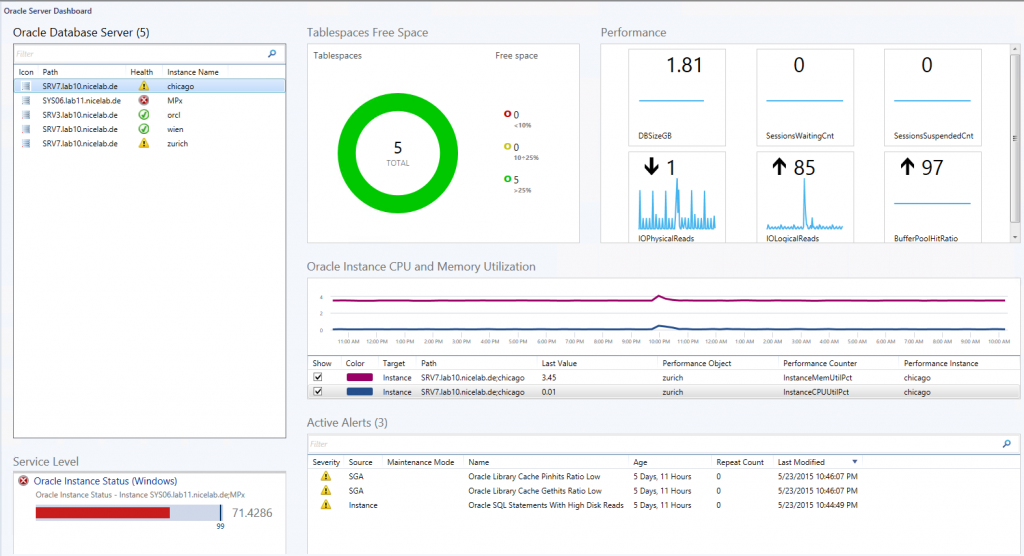
SCOM: Updated NiCE Oracle Management Pack version 3.10

NiCE have released an update to their Oracle Management Pack offering. Information on version 3.10 as well as pricing is available at their site NiCE.de.

This new version comes with a nice (pun intended) dashboard view as you can see below, as well as a host of new features:

Dashboard-1024x556


NEW Oracle Database monitoring features:

  • Upgraded widget-based visual dashboards
  • New and upgraded monitors and rules
  • Improved support for various cluster technologies, incl. FailSafe, RAC and DataGuard
  • Even more cluster support: Updated cluster views and discoveries
  • Dedicated Oracle 12c container database discoveries, monitors and rules
  • Support Oracle 9i,Oracle 10g, 11g and 12c included
  • Usability improvements for the configuration of large environments
  • Improved diagnostic tasks for SQL monitoring
  • Various documentation updates and extensions
  • Build-on and enhanced MP Self-Monitoring
  • Custom performance rule parameter to configure data warehouse storage

NEW Oracle ASM monitoring:

  • Full features Oracle ASM instance monitoring – out of the box
  • Discovery and monitoring of ASM Disk Group and ASM Instances
  • Unit monitors purpose build for ASM
  • Performance rules and views dedicated to ASM
  • Integrated into real application cluster views

Loading

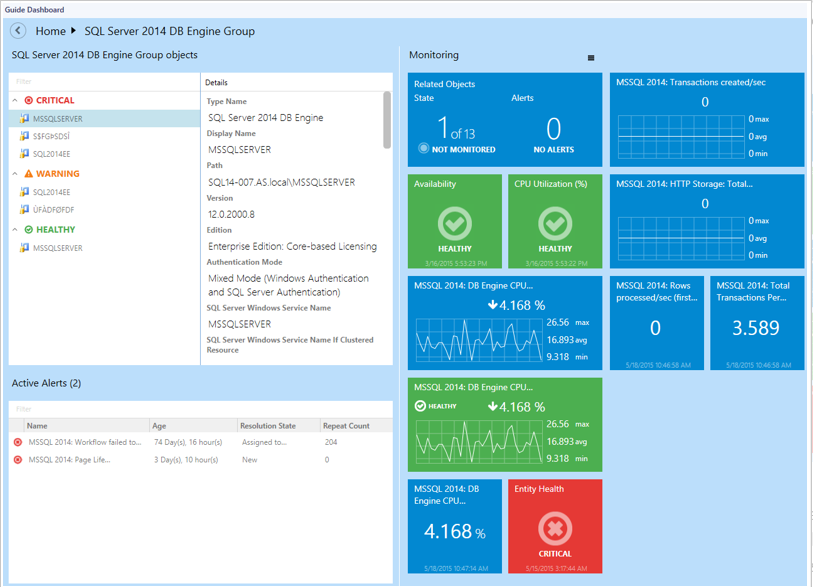
SCOM: Updated SQL management packs v 6.6.0.0

Microsoft has released updates of all of their SQL management packs to version 6.6.0.0, they are available for download at the links below, a brief what’s new is below the download links:

SQL Server 2005, 2008, 2008 R2, and SQL Server 2012 – Here
SQL Server 2014 – Here
SQL Server 2008 Analysis Services – Here
SQL Server 2012 Analysis Services – Here
SQL Server 2014 Analysis Services – Here
SQL Server 2014 Reporting Services (Native Mode) – Here
SQL Server 2012 Reporting Services (Native Mode) – Here
SQL Server 2008 Reporting Services (Native Mode) – Here

What’s new in 6.6.0.0

All of the management packs have had their dashboards replaced with new ones and the SQL Server management packs have the following additional updates:

newsqldashboard

SQL Server 2005, 2008, 2008 R2, and SQL Server 2012 v 6.6.0.0

  • Dashboards were replaced with the new ones
  • Components of replication functionality are deprecated and disabled by default
  • SPN monitor now correctly handles disjoined namespaces
  • Added support for filegroups containing filestreams and partition schemes
  • Memory Consumption monitor has been fixed
  • Upgradeability from 6.4.1.0 version is supported
  • Added CPU Usage monitor and rule for SQL Server 2005
  • Added ConsecutiveSamples Condition to the Buffer Cache Hit Ratio and Page Life Expectancy monitors
  • AlwaysOn discovery was reworked
  • Minor fixes.

SQL Server 2014 v 6.6.0.0

  • Dashboards were replaced with the new ones
  • SPN monitor now correctly handles disjoined namespaces
  • Added support for filegroups containing filestreams and partition schemes
  • Localization packs now works with the MP
  • Memory Consumption monitor has been fixed
  • Upgradeability from 6.4.1.0 version is supported
  • Added ConsecutiveSamples Condition to the Buffer Cache Hit Ratio, Page Life Expectancy, Transaction Log Free Space (%) and Resource Pool Memory Consumption monitors
  • AlwaysOn discovery was changed
  • Minor fixes.

sqlserver

Loading

SCOM: Updated Management Pack for Windows Azure Pack (WAP) V2

Oskar Landman has released an update for his community Management Pack for Windows Azure Pack. Version 2 can be downloaded here.

“This Management pack is written to monitor the health of your windows azure pack environment.”

New in this version:
NB. this version is NOT upgradable from V1.

  • Update the entire pack and have written some knowledge to some monitors to give more details on what is being monitored and why.
  • Another addition is now the pack is supported on WAP environments which have the roles separated.
  • Add some more visual stuff Icons
  • Added overrides to the web monitors where you can override the URL if necessary.
  • Plan and Subscription support.
  • Usage collection on Subscriptions

Loading